This is the abridged developer documentation for Kalora Cloud
# 404
> This page does not exist. Docs moved from /help-portal to /docs.
# Kalora Cloud documentation
> Pull, verify and deploy Kalora hardened container images, and use their SBOM, OpenVEX, CSAF 2.0 and SLSA evidence for CRA and NIS2.
Kalora publishes hardened, signed container and OS images on `registry.kaloracloud.eu`. Each image digest ships with an SBOM, vulnerability and VEX data, CIS checks and SLSA provenance, attached as OCI referrers and cosign attestations. You run the images in your own AWS, Azure, Kubernetes or NVIDIA GPU environment. [Quickstart](/docs/quickstart/)Public tags, registry auth, pull tokens and drop-in Dockerfiles. [Verify signatures & provenance](/docs/security/verification/)cosign, SLSA v1 provenance, Kyverno, Gatekeeper and policy-controller. [CRA & NIS2 feeds](/docs/compliance/cra-nis2/)SPDX, CycloneDX, OpenVEX and CSAF 2.0 mapped to CRA Annex I. [Image reference](/docs/images/)Base OS, distroless, language runtimes, services and GPU profiles. ## For AI assistants [Section titled “For AI assistants”](#for-ai-assistants) The full docs tree is published as [`/llms.txt`](/llms.txt), [`/llms-full.txt`](/llms-full.txt) and [`/llms-small.txt`](/llms-small.txt) for Claude Code, Cursor and other coding assistants.
# How to connect Scaleway Object Storage
> A step-by-step guide to connect Kalora with your Scaleway account.
This tutorial provides a clear, step-by-step process for creating an IAM API Key in Scaleway. This key will be associated with an **Application** in Scaleway, and will be used by KaloraCloud to write to your Object Storage. ## Step 0: Start a connection in KaloraCloud [Section titled “Step 0: Start a connection in KaloraCloud”](#step-0-start-a-connection-in-kaloracloud) To start, open Cloud Connections in your Kalora Dashboard. Note: If you’re comfortable with a command-line, see how to quickly [Connect Scaleway with CLI](/docs/clouds/scaleway-cli/). ## Step 1: Create a New Application [Section titled “Step 1: Create a New Application”](#step-1-create-a-new-application) Next, in your [Scaleway](https://console.scaleway.com/) console, you need to create an “Application” which will act as the identity for your API key. 1. Navigate to **Identity and Access Management (IAM)** in your Scaleway console. 2. Click on the **Applications** tab. 3. Click the **+ Create application** button. 4. Give your application a clear **Name** (e.g., `kalora-storage-app`) and an optional description. 5. **Important:** Do not attach a policy at this stage. Leave the policy field blank and click **Create application**. 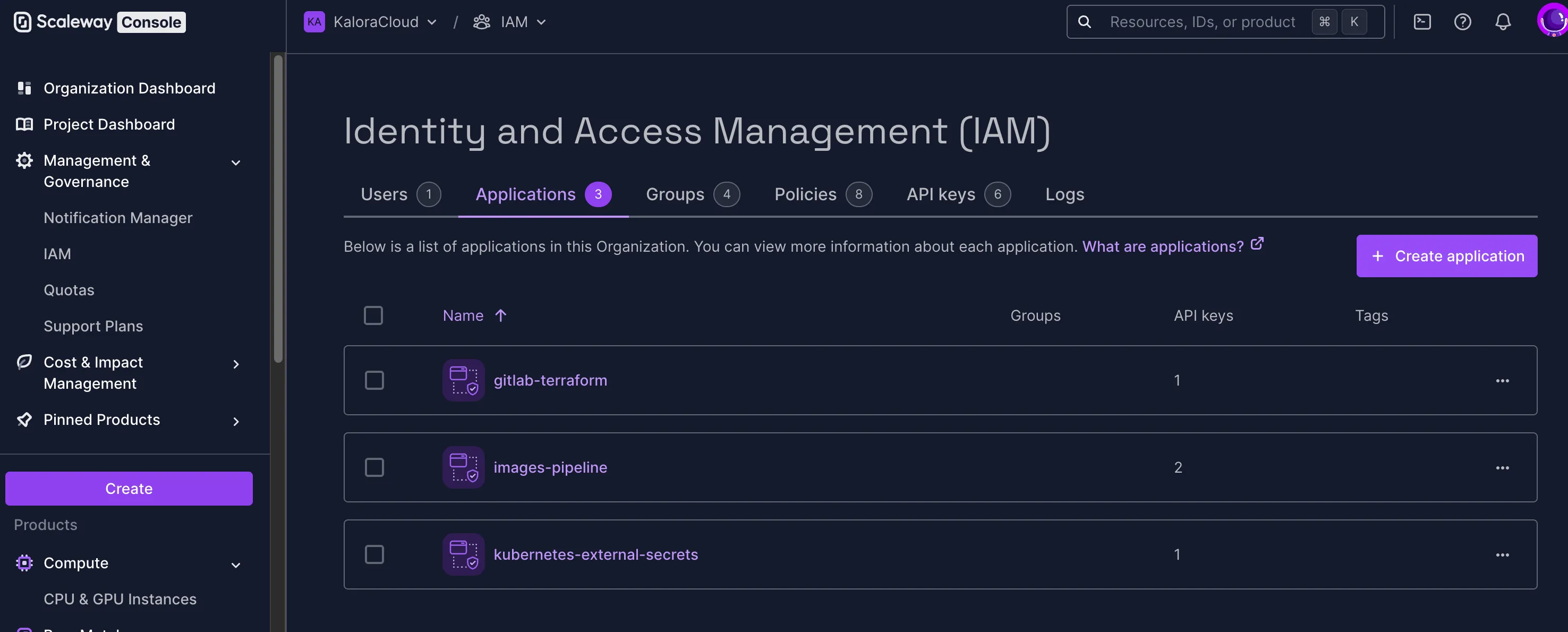 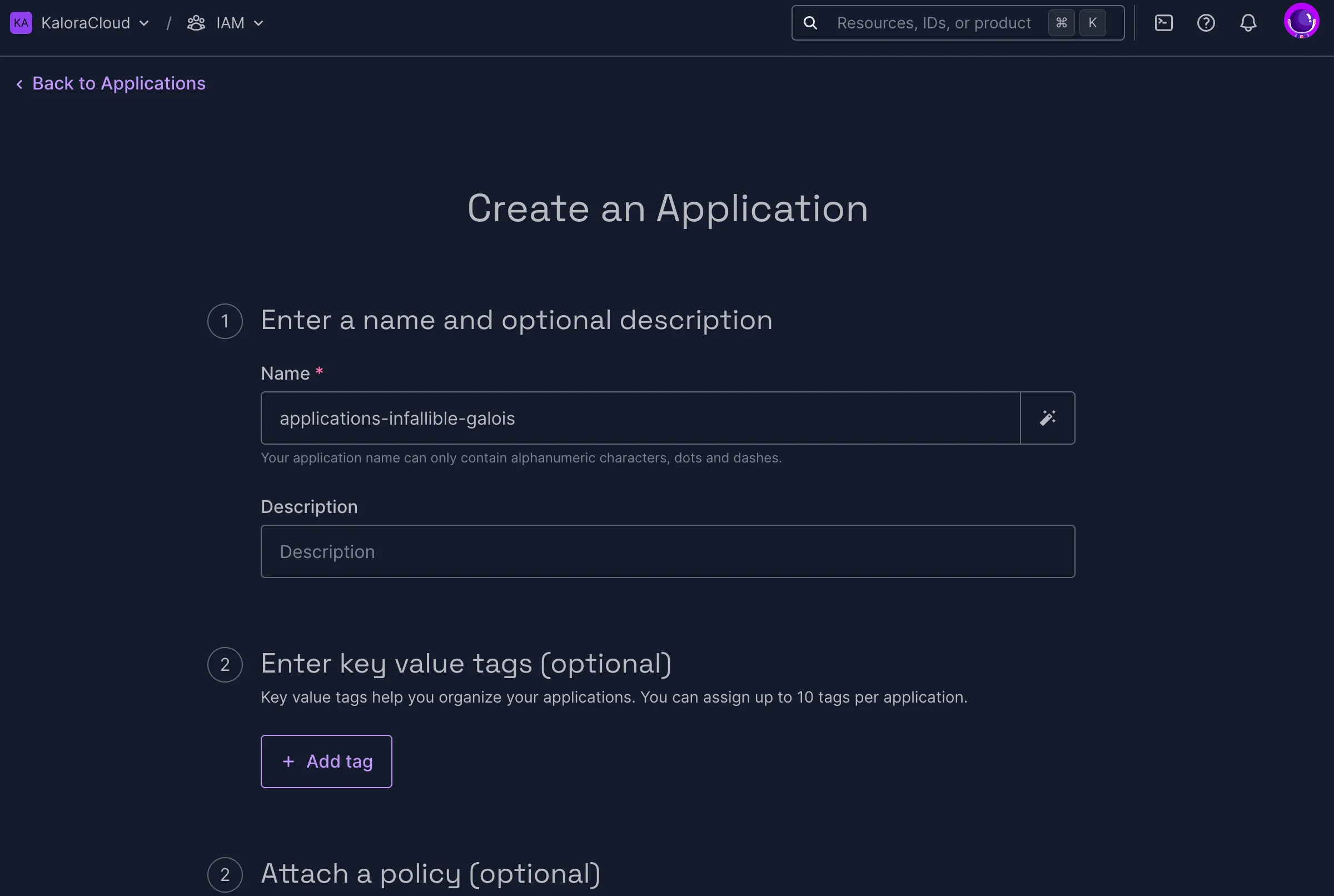 *** ## Step 2: Generate a New API Key [Section titled “Step 2: Generate a New API Key”](#step-2-generate-a-new-api-key) Now that the application exists, you can generate an API key for it. 1. While still in IAM, click on the **API keys** tab. 2. Click the **+ Generate API key** button. 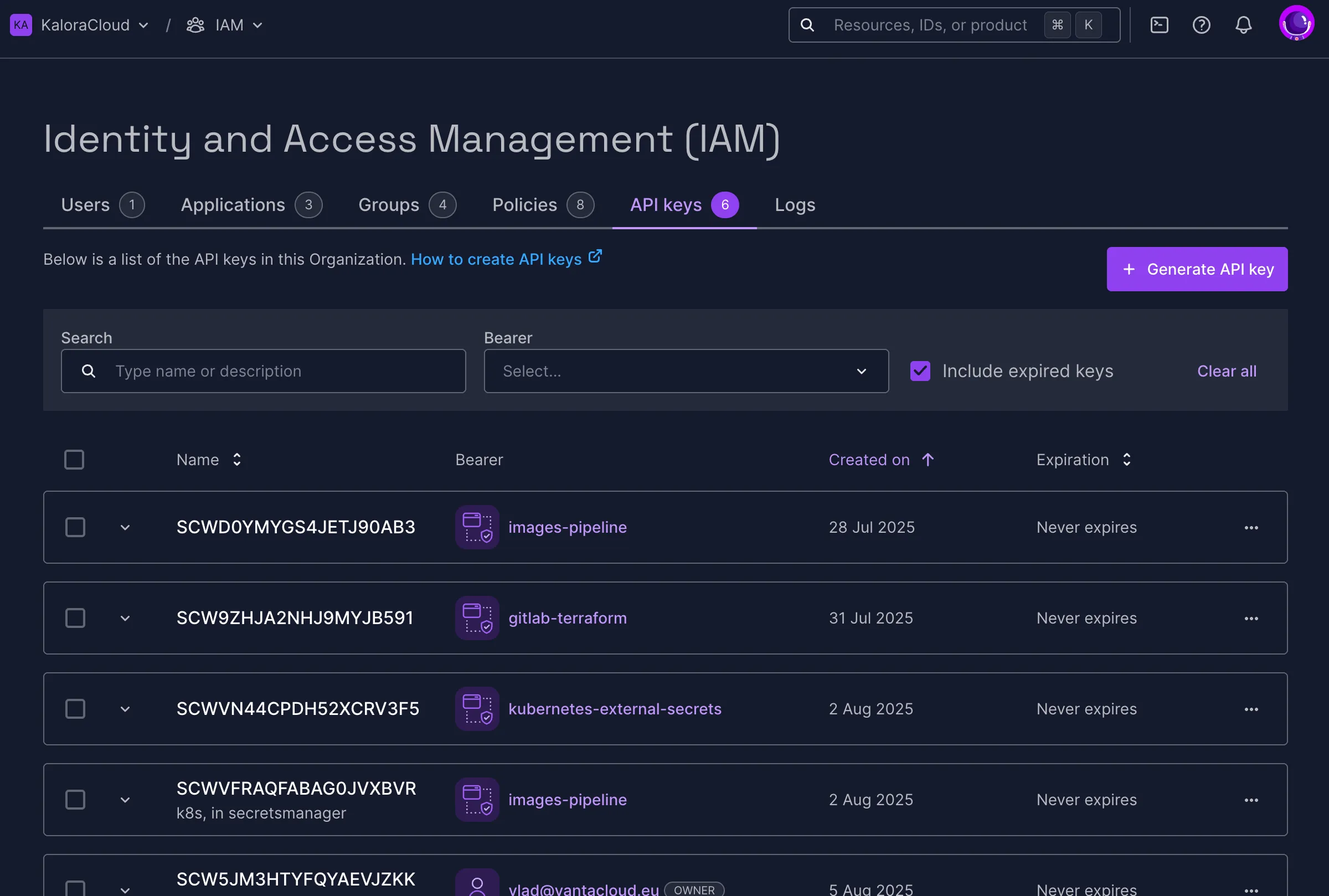 *** ## Step 3: Configure the API Key Bearer [Section titled “Step 3: Configure the API Key Bearer”](#step-3-configure-the-api-key-bearer) Here, you’ll link the new key to the application you created. 1. For the “API key bearer”, select **An application**. 2. In the dropdown, choose the application you just created (e.g., `kalora-storage-app`). 3. Set the **Expiration** to **Never** for a long-lasting key. 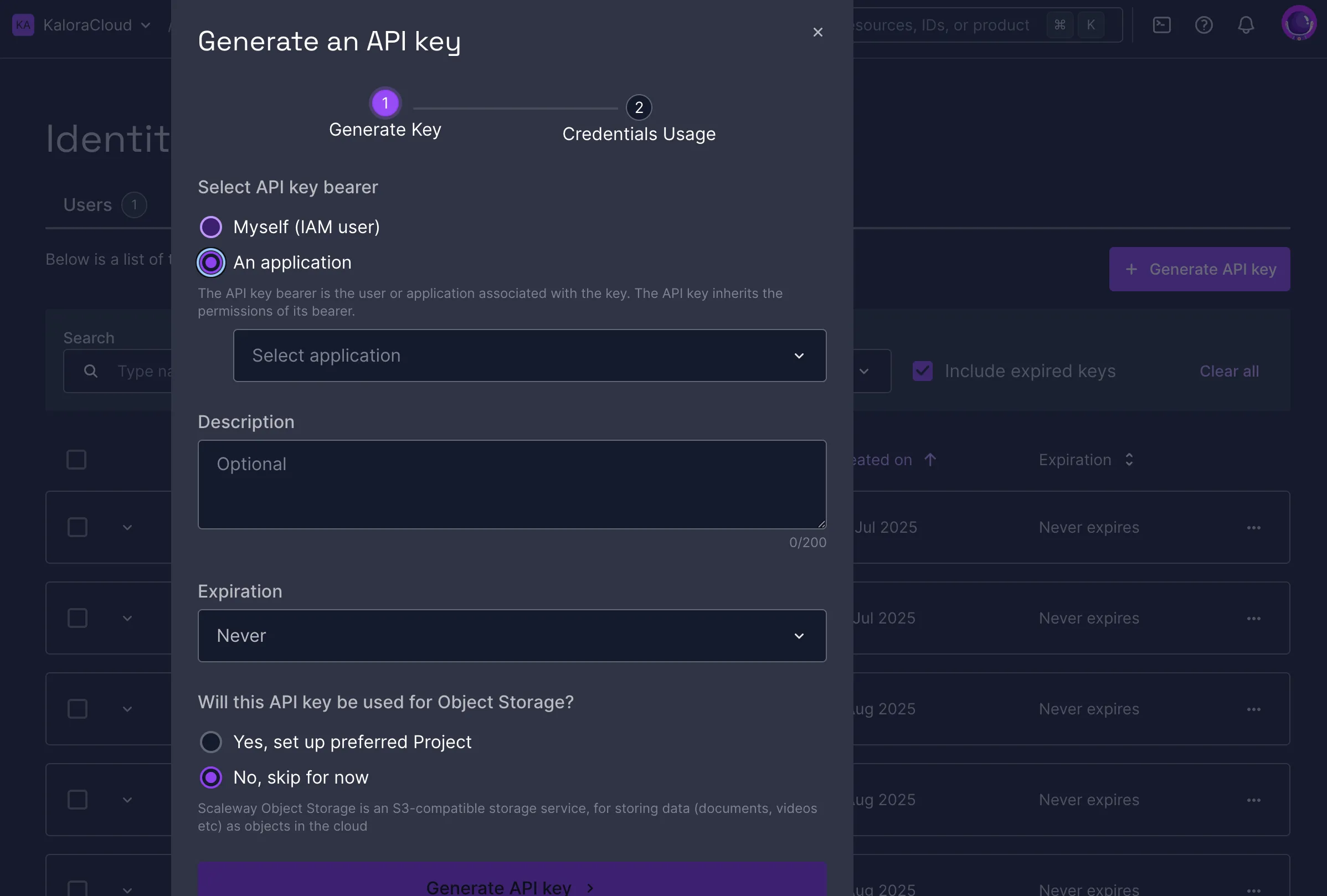 *** ## Step 4: Set the Preferred Project [Section titled “Step 4: Set the Preferred Project”](#step-4-set-the-preferred-project) To ensure the key has the correct default context for its operations, associate it with your primary project. 1. Select **Yes, set up preferred Project**. 2. Choose the Project that contains your Object Storage buckets from the dropdown menu. 3. Click **Generate API key**. 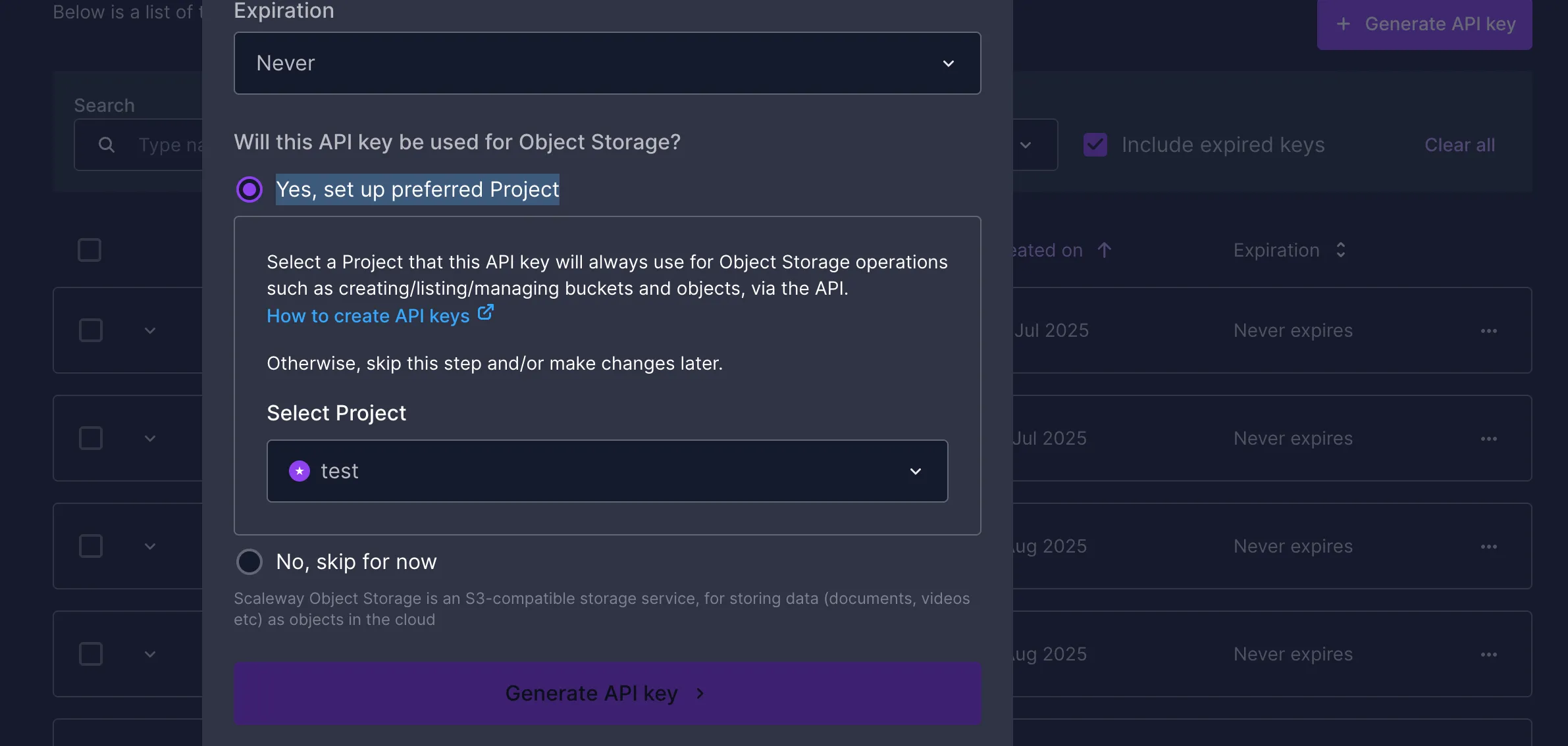 *** ## Step 5: Finish your connection [Section titled “Step 5: Finish your connection”](#step-5-finish-your-connection) This is the most critical step. Scaleway will only show you the Secret Key **once**. 1. The modal window will display your **Access Key** and **Secret Key**. 2. **Immediately copy the Secret Key** and go back to Kalora. 3. Paste the Access Key and the Secret Key in your cloud connection. **Note:** If you lose the Secret Key, you must delete this API key and generate a new one. *** ## Step 6: Define IAM Policy Permissions [Section titled “Step 6: Define IAM Policy Permissions”](#step-6-define-iam-policy-permissions) After saving the connection, you need to go back to Scaleway console and create a policy to grant Kalora specific permissions to write to your buckets. **1. Create Policy & Assign Principal** * Navigate to **IAM** > **Policies** and click **+ Create policy**. * Give the policy a clear **Name** (e.g., `kalora-object-storage-policy`). * For the **Principal**, select **Application** and choose the app you created earlier. * Click **Add rules**. 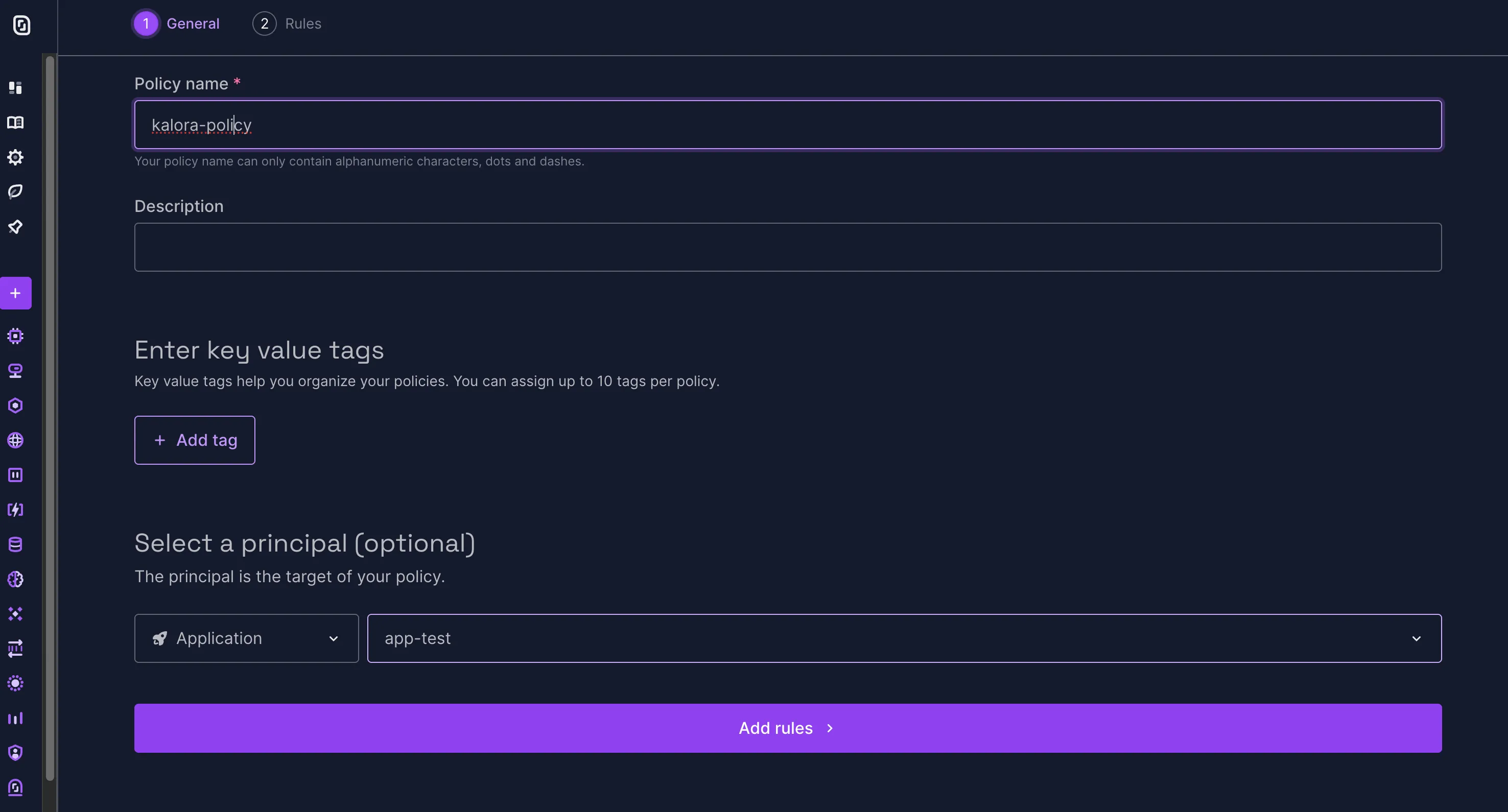 **2. Define the Rule’s Scope** * Select **Access to resources**. * Choose the **Project** where your storage buckets will be. * Click **Validate**. 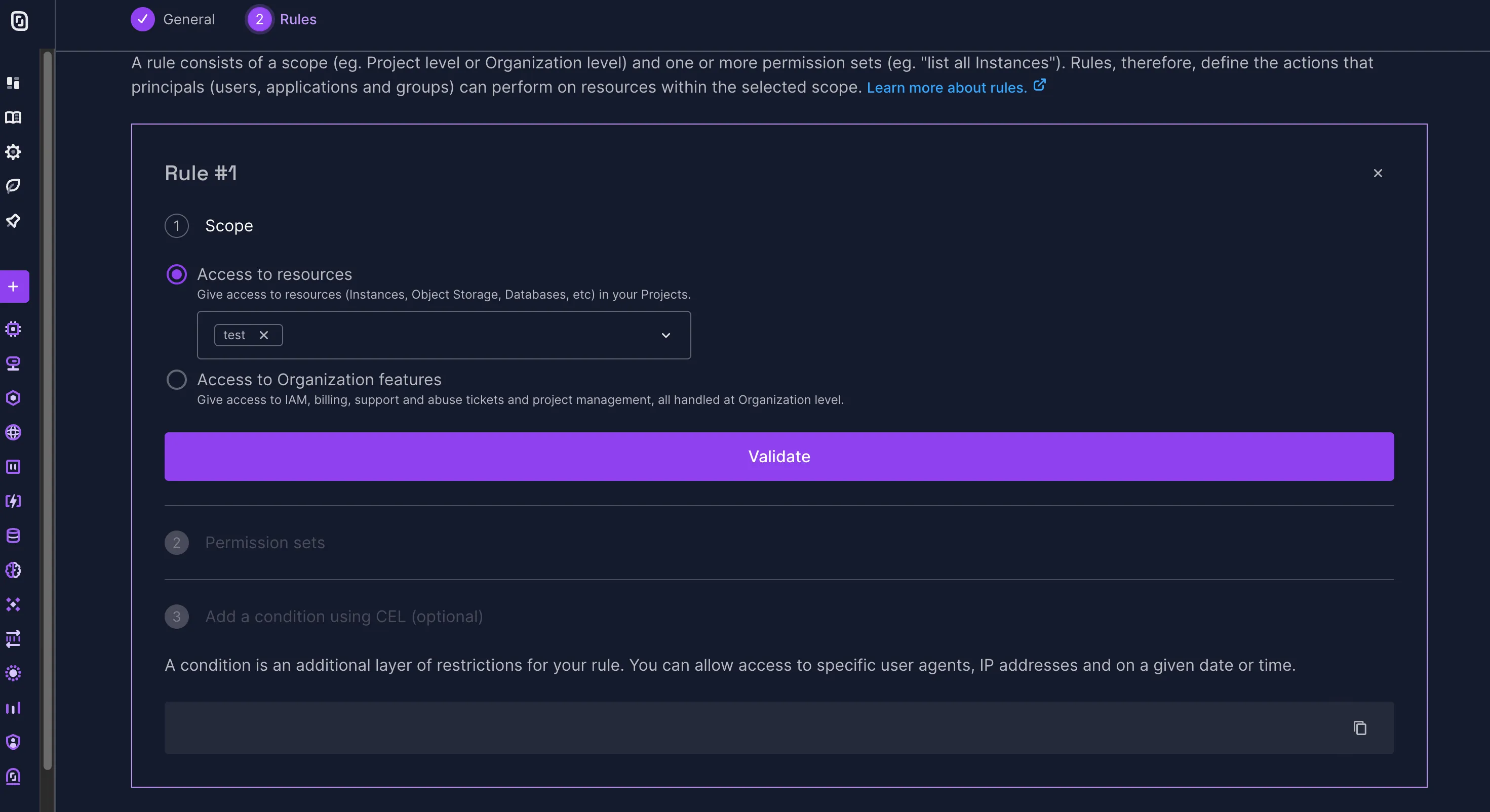 **3. Set Storage Permissions** * In the **Permission sets** list, select **Storage**. * Check the boxes for **ObjectStorageObjectsRead** and **ObjectStorageObjectsWrite**. * Click **Create policy**. 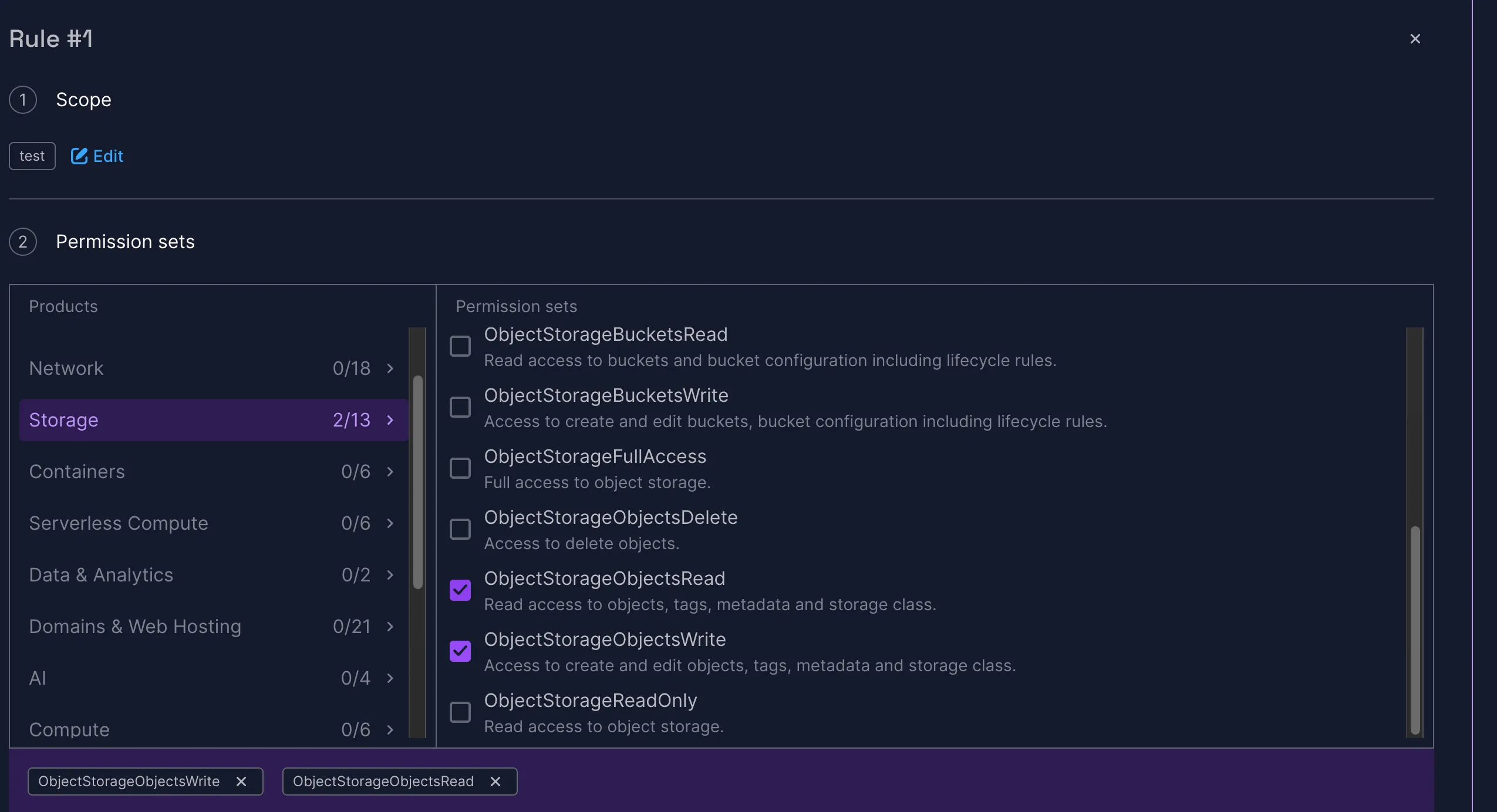 *** ## Step 7: Create the Object Storage Buckets [Section titled “Step 7: Create the Object Storage Buckets”](#step-7-create-the-object-storage-buckets) Finally, create the buckets where your files will be stored. * Navigate to **Object Storage** from the main console menu. * Click **+ Create bucket**. * Choose a **Region**. If you deploy in multiple regions, you will need one bucket per region. * Enter a unique **Bucket name**. * If you need **multiple regions**, a good way to get an unique name is to append the region name to it. * for example `my-bucket-par`, `my-bucket-ams`, `my-bucket-war`. * Set the visibility to **Private** and do not enable Versioning. * Click **Create bucket**. 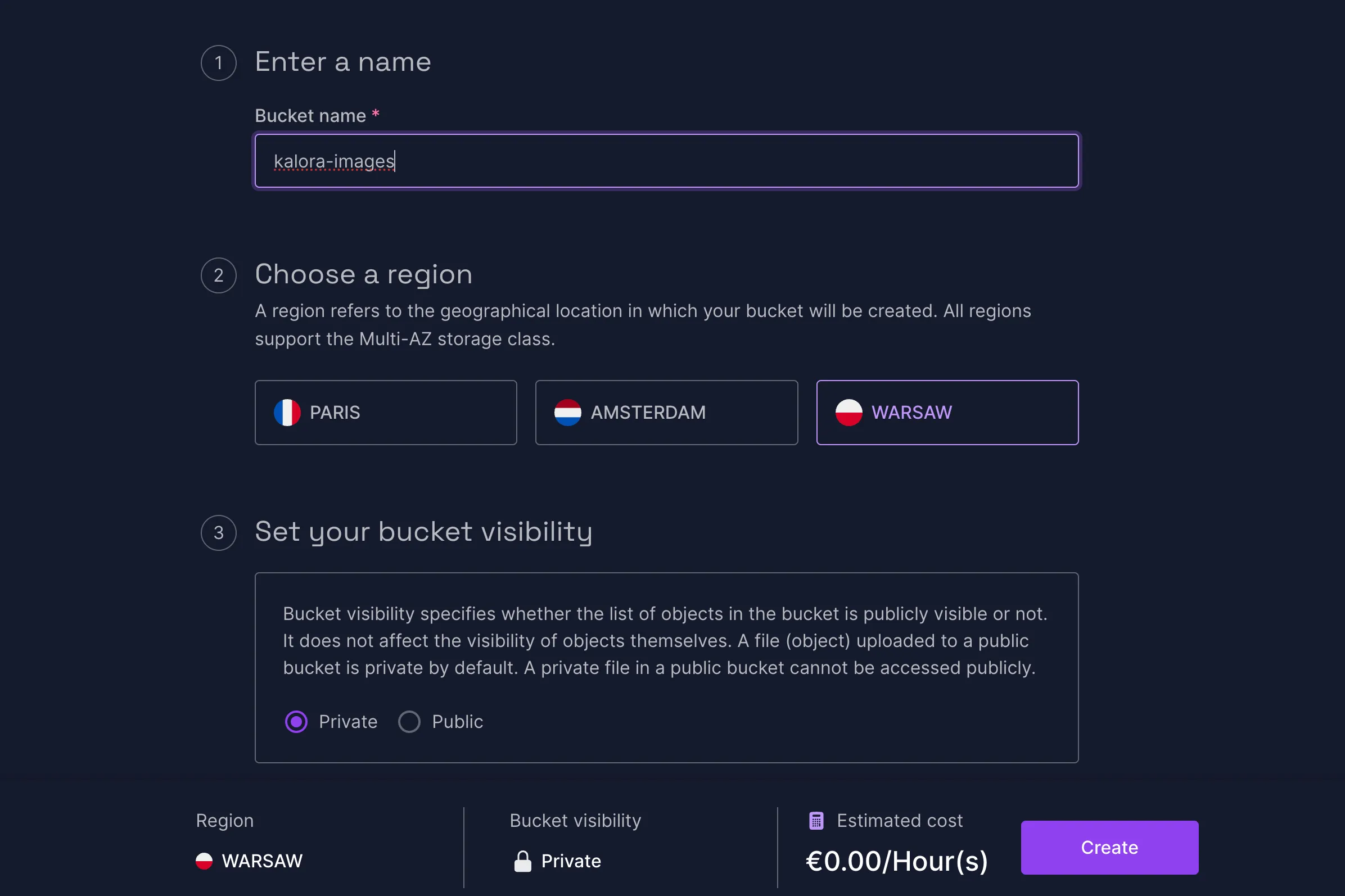
# How to connect Scaleway Object Storage via CLI
> A step-by-step guide to connect Kalora with your Scaleway account using CLI.
This guide details how to create a secure IAM Application, a scoped Policy, an API Key, and Object Storage buckets in multiple regions using the `scw` Scaleway CLI. This method is ideal if you want to automate creation or prefer working with command-line tools. ## Prerequisites [Section titled “Prerequisites”](#prerequisites) 1. **Scaleway CLI (`scw`)**: Ensure `scw` is [installed and configured](https://github.com/scaleway/scaleway-cli/blob/master/docs/getting-started.md). 2. **`jq`**: This command-line JSON processor is used to parse outputs. Install it with `brew install jq`, `apt-get install jq`, or `choco install jq`. 3. **Your IDs**: You will need your **Organization ID** and **Project ID**. * Find your Organization ID: `scw organization list` * Find your Project ID: `scw project list` ## Start a connection [Section titled “Start a connection”](#start-a-connection) In Kalora, go to Cloud Accounts and add a new Scaleway account. Use the values from the script to populate the form and submit it. ## The Complete Automation Script [Section titled “The Complete Automation Script”](#the-complete-automation-script) This script performs all necessary steps. You only need to configure the variables in the first section.
```bash
#!/bin/bash
# --- 1. CONFIGURE YOUR VARIABLES ---
# Replace with your actual IDs from the prerequisites step.
export SCW_ORGANIZATION_ID="YOUR_ORGANIZATION_ID"
export SCW_PROJECT_ID="YOUR_PROJECT_ID"
# Define the regions where you want to create buckets.
# Available regions: fr-par, nl-ams, pl-waw
export REGIONS=("fr-par" "nl-ams")
# Define a base name for your resources.
export RESOURCE_NAME="kalora-multi-region"
# --- 2. CREATE IAM APPLICATION ---
echo "Creating IAM application: ${RESOURCE_NAME}-app..."
# We create the application and use jq to extract its ID from the JSON output.
export APP_ID=$(scw iam application create \
name="${RESOURCE_NAME}-app" \
organization-id="$SCW_ORGANIZATION_ID" \
-o json | jq -r '.id')
if [ -z "$APP_ID" ]; then
echo "Error: Failed to create application. Check your Organization ID."
exit 1
fi
echo "Application created with ID: $APP_ID"
echo "---------------------------------"
# --- 3. CREATE IAM POLICY ---
echo "Creating IAM policy: ${RESOURCE_NAME}-policy..."
# This policy grants the application read/write access to objects
# within the specified project, covering all regions within it.
scw iam policy create \
name="${RESOURCE_NAME}-policy" \
principal="application_id=$APP_ID" \
rule.0.project-ids.0="$SCW_PROJECT_ID" \
rule.0.permission-set-names.0=ObjectStorageObjectsRead \
rule.0.permission-set-names.1=ObjectStorageObjectsWrite
echo "Policy created and attached to application."
echo "---------------------------------"
# --- 4. CREATE API KEY ---
echo "--- IMPORTANT: GENERATING API KEY ---"
echo "The following output contains your Secret Key. It will only be shown ONCE."
echo "Copy and save it in a secure location immediately."
# Generate the API key for the application.
scw iam api-key create application-id="$APP_ID"
echo "---------------------------------"
read -p "Press [Enter] to continue after you have saved your keys..."
# --- 5. CREATE OBJECT STORAGE BUCKETS ---
echo "Creating Object Storage buckets in multiple regions..."
for REGION in "${REGIONS[@]}"; do
BUCKET_NAME="${RESOURCE_NAME}-bucket-${REGION}"
echo "Creating bucket '$BUCKET_NAME' in region '$REGION'..."
scw object bucket create \
name="$BUCKET_NAME" \
--region "$REGION"
done
echo "All buckets created successfully."
echo "---------------------------------"
# --- 6. VERIFY BUCKET CREATION ---
echo "Verifying buckets across all defined regions..."
for REGION in "${REGIONS[@]}"; do
echo ""
echo "--- Buckets in region: $REGION ---"
scw object bucket list --region "$REGION"
done
echo "---------------------------------"
echo "Setup complete!"
```
# CRA & NIS2 compliance feeds
> SPDX and CycloneDX SBOMs, OpenVEX and CSAF 2.0 advisories, CIS checks and SLSA provenance per image digest, mapped to EU Cyber Resilience Act Annex I.
Every Kalora image digest carries machine-readable evidence: what is inside, which vulnerabilities apply, how it was built. You fetch it from the registry next to the image and feed it into your own SBOM inventory, vulnerability management and CRA technical documentation. ## Artifacts per digest [Section titled “Artifacts per digest”](#artifacts-per-digest) | Artifact | Format | How to fetch | | --------------------- | ----------------------------- | ------------------------------------------------------------------------------------------------------------------ | | SBOM | SPDX 2.3 JSON | `cosign verify-attestation --type spdxjson`, or referrer `application/spdx+json` | | SBOM | CycloneDX 1.7 JSON | referrer `application/vnd.cyclonedx+json` | | Exploitability | OpenVEX 0.2.0 | `cosign verify-attestation --type openvex`, or referrer `application/vnd.openvex+json` | | Advisory | CSAF 2.0 (`csaf_vex`) | `cosign verify-attestation --type https://csaf.io/schema/csaf/2.0`, or referrer `application/vnd.kalora.csaf+json` | | Build provenance | SLSA v1 (in-toto) | `cosign verify-attestation --type slsaprovenance1` | | Configuration checks | CIS Docker Benchmark §4 | referrer `application/vnd.kalora.cis-report+json` | | Scan results | Trivy JSON, summary, licenses | referrers `application/vnd.kalora.{trivy-report,scan-summary,license-report}+json` | | Human-readable report | HTML | referrer `application/vnd.kalora.security-report+html` | CSAF advisories are published only for digests with findings. A digest with zero findings gets an OpenVEX sentinel statement instead, since an empty CSAF document is schema-invalid. Fetch everything for one digest:
```bash
IMAGE=registry.kaloracloud.eu/kalora/debian-minimal
DIGEST=$(crane digest "${IMAGE}:bookworm")
oras discover "${IMAGE}@${DIGEST}" --format tree
ref() { oras discover "${IMAGE}@${DIGEST}" --artifact-type "$1" --format json | jq -r '.referrers[0].digest // .manifests[0].digest'; }
for t in application/spdx+json application/vnd.cyclonedx+json \
application/vnd.openvex+json application/vnd.kalora.csaf+json; do
oras pull -o "./evidence/${t##*/}" "${IMAGE}@$(ref "$t")"
done
```
Use `cosign verify-attestation` (see [Verification](/docs/security/verification/#verify-attestations)) when you need the signature checked as well. Referrers are unsigned convenience copies. ## Schema examples [Section titled “Schema examples”](#schema-examples) Excerpts from live documents published on 17 November 2026. ### SPDX 2.3 [Section titled “SPDX 2.3”](#spdx-23) From `kalora/python-hardened:3.12`. One package per installed APK, each with a PURL and concluded license:
```json
{
"spdxVersion": "SPDX-2.3",
"name": "registry.kaloracloud.eu/kalora/python-hardened@sha256:a16f86f6...add80",
"creationInfo": {
"creators": ["Organization: aquasecurity", "Tool: trivy-0.76.1"],
"created": "2026-11-17T20:33:12Z"
},
"packages": [
{
"name": "ca-certificates-bundle",
"versionInfo": "20261020-r0",
"licenseConcluded": "MPL-2.0 AND MIT",
"externalRefs": [{
"referenceCategory": "PACKAGE-MANAGER",
"referenceType": "purl",
"referenceLocator": "pkg:apk/wolfi/ca-certificates-bundle@20261020-r0?arch=x86_64&distro=20230201"
}]
}
]
}
```
### CycloneDX 1.7 [Section titled “CycloneDX 1.7”](#cyclonedx-17)
```json
{
"bomFormat": "CycloneDX",
"specVersion": "1.7",
"components": [
{ "type": "operating-system", "name": "wolfi", "version": "20230201" }
]
}
```
### OpenVEX 0.2.0 [Section titled “OpenVEX 0.2.0”](#openvex-020) A zero-findings digest. The sentinel statement records the feed database version the scan ran against:
```json
{
"@context": "https://openvex.dev/ns/v0.2.0",
"@id": "https://kaloracloud.eu/vex/kalora/python-hardened/sha256:a16f86f6...add80/20261117T203456Z",
"author": "Kalora Cloud ",
"timestamp": "2026-11-17T20:34:56Z",
"version": 1,
"statements": [
{
"vulnerability": {
"name": "KALORA-NO-KNOWN-VULNERABILITIES",
"description": "Sentinel for a digest whose scan reported zero findings."
},
"products": [{
"@id": "pkg:oci/python-hardened@sha256:a16f86f6...add80?repository_url=registry.kaloracloud.eu%2Fkalora%2Fpython-hardened"
}],
"status": "not_affected",
"justification": "component_not_present",
"status_notes": "0 findings at feed DB version 2026-11-17T19:11:29Z"
}
]
}
```
For digests with findings, each statement names the CVE with its `EUVD-YYYY-NNNNN` alias. Entries on the EU KEV list get an `action_statement`. ### CSAF 2.0 (`csaf_vex`) [Section titled “CSAF 2.0 (csaf_vex)”](#csaf-20-csaf_vex) From `kalora/debian-minimal:bookworm`:
```json
{
"document": {
"category": "csaf_vex",
"csaf_version": "2.0",
"title": "Kalora VEX advisory for debian-minimal@sha256:1166f51e...edff6",
"publisher": {
"category": "vendor",
"name": "Kalora Cloud",
"namespace": "https://kaloracloud.eu",
"contact_details": "security@kaloracloud.eu"
},
"tracking": {
"id": "KALORA-VEX-debian-minimal-latest-1166f51e780f",
"status": "final",
"version": "1",
"current_release_date": "2026-11-17T20:33:01Z"
}
},
"vulnerabilities": [
{
"cve": "CVE-2005-2541",
"product_status": { "known_not_affected": ["CSAFPID-0001"] },
"flags": [{
"label": "vulnerable_code_cannot_be_controlled_by_adversary",
"product_ids": ["CSAFPID-0001"]
}],
"threats": [{
"category": "impact",
"details": "Package tar (1.34+dfsg-1.2+deb12u1) is not affected by CVE-2005-2541",
"product_ids": ["CSAFPID-0001"]
}]
}
]
}
```
Every CSAF document is validated against the CSAF 2.0 schema and the §6.1 mandatory tests for the `csaf_vex` profile before publishing. OpenVEX is validated against the 0.2.0 schema and `vexctl`. ### CIS report [Section titled “CIS report”](#cis-report)
```json
{
"ID": "kalora-docker-cis",
"Title": "CIS Docker Benchmark (Automated Image Checks)",
"Version": "1.6.0",
"Results": [
{ "ID": "4.1", "Name": "Ensure that a user for the container has been created" },
{ "ID": "4.10", "Name": "Ensure secrets are not stored in Dockerfiles or image config" }
]
}
```
## CRA Annex I mapping [Section titled “CRA Annex I mapping”](#cra-annex-i-mapping) Regulation (EU) 2024/2847, Annex I. Kalora covers the container base layer; your application layer needs its own evidence. ### Part I: security properties [Section titled “Part I: security properties”](#part-i-security-properties) | Requirement | Kalora evidence | | ------------------------------------------------ | ----------------------------------------------------------------------------------------------------- | | (2)(a) No known exploitable vulnerabilities | Trivy scan per digest, OpenVEX and CSAF triage, EUVD and EU KEV enrichment | | (2)(b) Secure-by-default configuration | Non-root UID 65532, CIS Docker Benchmark §4 report | | (2)(c) Vulnerabilities addressed through updates | Daily rebuilds, new digest per fix, VEX re-issued per digest | | (2)(f) Integrity of software | cosign signature, SLSA v1 provenance, digest pinning | | (2)(j) Limited attack surface | Minimal package sets, no shell in language runtimes, [benchmark vs upstream](/docs/images/benchmark/) | ### Part II: vulnerability handling [Section titled “Part II: vulnerability handling”](#part-ii-vulnerability-handling) | Requirement | Kalora evidence | | --------------------------------------------- | ----------------------------------------------------- | | (1) Identify components, draw up an SBOM | SPDX 2.3 and CycloneDX 1.7 per digest, with PURLs | | (2) Remediate without delay | Daily rebuilds against upstream security feeds | | (3) Regular tests and reviews | Scan, CIS checks and VEX validation on every build | | (4) Disclose fixed vulnerabilities | CSAF 2.0 advisories and OpenVEX statements per digest | | (6) Contact address for vulnerability reports | `security@kaloracloud.eu` | | (7) Secure distribution of updates | Signed images over TLS from `registry.kaloracloud.eu` | | (8) Updates without delay, with advisories | New signed digest plus OpenVEX/CSAF per rebuild | ## NIS2 [Section titled “NIS2”](#nis2) NIS2 Article 21(2)(d) and (e) require supply-chain security and secure acquisition and maintenance of systems. The same artifacts serve as supplier evidence: signed provenance for (d), SBOM plus VEX for vulnerability handling under (e).
# Image catalog
> Reference for every Kalora hardened image on registry.kaloracloud.eu, with defaults shared by all images.
[Base OS & distroless](/docs/images/base-os/)Wolfi, Alpine, Debian and UBI bases. [Language runtimes & services](/docs/images/runtimes/)Python, Node.js, Go, Java, PostgreSQL, Redis, nginx. [GPU & AI profiles](/docs/images/gpu/)CUDA, GPU Operator and vLLM inference profiles. [Benchmark vs upstream](/docs/images/benchmark/)CVEs, size and attack surface against official images. ## Defaults for every image [Section titled “Defaults for every image”](#defaults-for-every-image) | Property | Value | | --------- | --------------------------------------------------------------------------------------------- | | Registry | `registry.kaloracloud.eu/kalora/` (public) | | User | `nonroot`, UID/GID `65532` | | Platforms | `linux/amd64`, `linux/arm64` | | Rebuilds | Daily, new digest per rebuild | | Build | Declarative apko (Wolfi, Alpine), mmdebstrap (Debian), rootfs install (UBI) | | Signing | cosign keyed signature, SLSA v1 provenance | | Evidence | SPDX, CycloneDX, OpenVEX, CSAF 2.0, CIS, Trivy report ([details](/docs/compliance/cra-nis2/)) | | TLS | `SSL_CERT_FILE=/etc/ssl/certs/ca-certificates.crt` preset | ## Kubernetes securityContext [Section titled “Kubernetes securityContext”](#kubernetes-securitycontext) All images run unchanged under the `restricted` Pod Security Standard:
```yaml
securityContext:
runAsNonRoot: true
runAsUser: 65532
runAsGroup: 65532
allowPrivilegeEscalation: false
readOnlyRootFilesystem: true
capabilities:
drop: ["ALL"]
seccompProfile:
type: RuntimeDefault
```
With `readOnlyRootFilesystem`, mount an `emptyDir` wherever the process writes (e.g. `/tmp`, data directories).
# Base OS & distroless
> Kalora Wolfi, Alpine, Debian and Red Hat UBI base images for building your own hardened images.
Use a base image as the final stage of a multi-stage build, or as the parent of your own image. Base images include `/bin/sh` (BusyBox on Wolfi and Alpine) so shell-form `RUN` works; [language runtimes](/docs/images/runtimes/) do not. | Image | Tags | Distro | Shell | Entrypoint | | ---------------- | ---------------- | ----------------- | ---------- | ---------- | | `wolfi-base` | `latest` | Wolfi (glibc) | BusyBox | `/bin/sh` | | `alpine-base` | `3.24`, `latest` | Alpine (musl) | BusyBox | `/bin/sh` | | `debian-minimal` | `bookworm` | Debian 12 minbase | dash, bash | `/bin/sh` | | `ubi-minimal` | `9` | Red Hat UBI 9 | bash | `/bin/sh` | ## wolfi-base [Section titled “wolfi-base”](#wolfi-base) glibc, CA bundle, tzdata and BusyBox. The default runtime stage for static or glibc-linked binaries (Go, Rust, C/C++).
```dockerfile
FROM registry.kaloracloud.eu/kalora/wolfi-base:latest
COPY --chown=65532:65532 app /usr/local/bin/app
ENTRYPOINT ["/usr/local/bin/app"]
```
## alpine-base [Section titled “alpine-base”](#alpine-base) `alpine-baselayout`, `alpine-keys`, BusyBox, CA bundle and tzdata. Use it for musl-linked binaries or when you need Alpine’s package set. ## debian-minimal [Section titled “debian-minimal”](#debian-minimal) Built with `mmdebstrap --variant=minbase`, optionally pinned to a `snapshot.debian.org` timestamp. Use it when you depend on Debian packages or glibc ABI compatibility with Debian-built binaries. ## ubi-minimal [Section titled “ubi-minimal”](#ubi-minimal) Red Hat Universal Base Image 9 rootfs with a `nonroot` user. Use it for RHEL-certified stacks and OpenShift. ## Choosing a base [Section titled “Choosing a base”](#choosing-a-base) | Need | Base | | -------------------------- | ---------------- | | Smallest glibc runtime | `wolfi-base` | | musl, Alpine packages | `alpine-base` | | Debian `.deb` dependencies | `debian-minimal` | | RHEL / OpenShift support | `ubi-minimal` | Measured size, package count and CVEs against upstream equivalents: [benchmark](/docs/images/benchmark/).
# How Kalora images compare to upstream: CVEs, size and attack surface
> A reproducible benchmark of all 11 Kalora hardened catalog images against upstream official, slim and Alpine equivalents: CVEs (Trivy, OpenVEX, Grype), size, layers, packages and attack surface.
Kalora images are built to ship only what your workload needs. This article measures all 11 images in the Kalora catalog against the upstream official, `-slim`, and `-alpine` images most teams start from, using daemonless open-source tools you can run yourself. Everything below comes from a single, dated run: exact tool versions, vulnerability database timestamps, OpenVEX referrers, and image digests are listed so you can verify every number. **Results date:** 17 November 2026 (run finished 20:10 UTC) · **Platform:** `linux/amd64` ## Headline results [Section titled “Headline results”](#headline-results) * **Zero Trivy CVEs on 8 of 12 Kalora images:** `wolfi-base`, `alpine-base`, `python-hardened:3.12`, `golang-hardened:1.26`, `golang-hardened:1.27`, `java-openjdk:21`, `redis-hardened:7.2`, and `nginx-hardened:1.26` all report **0 vulnerabilities** in Trivy (vs **31 to 940** in the Debian-based upstream images they replace, and **1 to 54** in `-alpine` upstream images). * **Zero EU-KEV vulnerabilities:** None of the 12 Kalora images contain a CVE listed in ENISA’s EU Known Exploited Vulnerabilities (EU-KEV) catalog. Six upstream images (`golang:1.26`, `golang:1.27`, `nginx:1.26`, `nginx:1.26-alpine`, `node:22`, and `python:3.12`) carry EU-KEV findings (`CVE-2026-123158`, `CVE-2026-111497`, `CVE-2023-44487`). * **Smaller footprint & stripped attack surface:** Compared with full official images, `python-hardened:3.12` is **92.2% smaller** compressed (`32.2 MB` vs `411.9 MB`), `node-hardened:22` is **84.8% smaller** (`62.1 MB` vs `408.4 MB`), `nginx-hardened:1.26` is **87.7% smaller** (`8.8 MB` vs `72.2 MB`), and `ubi-minimal:latest` is **72.6% smaller** than `ubi9/ubi-minimal` (`11.1 MB` vs `40.7 MB`). Every Kalora runtime image is single-layer, ships no OS package manager, removes all SUID/SGID binaries (except `debian-minimal`), and runs as non-root UID `65532` by default. ## Methodology [Section titled “Methodology”](#methodology) ### Image pairs [Section titled “Image pairs”](#image-pairs) Each of the 11 Kalora catalog images (including both active Go versions) is compared with the upstream official, `-slim`, and `-alpine` equivalents teams typically evaluate: | Kalora image | Upstream comparisons | | ----------------------------------------- | ------------------------------------------------------- | | `wolfi-base:latest`, `alpine-base:latest` | `alpine:3`, `debian:bookworm-slim` | | `debian-minimal:latest` | `debian:bookworm`, `debian:bookworm-slim` | | `ubi-minimal:latest` | `registry.access.redhat.com/ubi9/ubi-minimal:latest` | | `python-hardened:3.12` | `python:3.12`, `python:3.12-slim`, `python:3.12-alpine` | | `node-hardened:22` | `node:22`, `node:22-slim`, `node:22-alpine` | | `golang-hardened:1.26` | `golang:1.26`, `golang:1.26-alpine` | | `golang-hardened:1.27` | `golang:1.27`, `golang:1.27-alpine` | | `java-openjdk:21` | `eclipse-temurin:21`, `eclipse-temurin:21-jre-alpine` | | `postgres-hardened:16` | `postgres:16`, `postgres:16-alpine` | | `redis-hardened:7.2` | `redis:7.2`, `redis:7.2-alpine` | | `nginx-hardened:1.26` | `nginx:1.26`, `nginx:1.26-alpine` | Kalora images are pulled anonymously from `registry.kaloracloud.eu/kalora/:`. Upstream images come from Docker Hub (`docker.io/library/*`) and the Red Hat registry (`registry.access.redhat.com`). ### Pinning [Section titled “Pinning”](#pinning) * **Images are pinned by digest.** Each tag is resolved once to its `linux/amd64` manifest digest with `crane digest --platform linux/amd64`, pulled once as an OCI tarball (`crane pull`), and scanned daemonlessly so every tool sees the exact same bytes. The digests are listed in [Image digests](#image-digests). * **Vulnerability databases are pinned for the whole run.** Databases are downloaded once before the run and automatic updates are disabled (`--skip-db-update --skip-java-db-update` for Trivy; `GRYPE_DB_AUTO_UPDATE=false` for Grype). * **OpenVEX referrers are evaluated alongside raw scans.** For Kalora images, `oras discover` pulls any attached `application/vnd.openvex+json` OCI referrer; when `not_affected` or `fixed` statements are present for CVEs, we report both the raw Trivy count and the post-VEX count (`trivy --vex`). | Tool | Version | Database snapshot | | ------------------------------------------------------- | ------- | ------------------------------------------------------------------------------------------------- | | [Trivy](https://github.com/aquasecurity/trivy) | 0.76.1 | `trivy-db` v2, updated `2026-11-17T13:00:16Z`; `trivy-java-db` v1, updated `2026-11-17T00:59:10Z` | | [Grype](https://github.com/anchore/grype) | 0.121.0 | `grype` DB schema `v6.1.10`, built `2026-11-17T06:20:58Z` | | [Syft](https://github.com/anchore/syft) | 1.55.0 | n/a (SBOM generation) | | [crane](https://github.com/google/go-containerregistry) | 0.20.3 | n/a (daemonless pull, export, digests, manifests) | | [oras](https://oras.land/) | 1.3.0 | n/a (OCI referrer discovery for OpenVEX) | | ENISA EUVD | n/a | CVE↔EUVD mapping dump (407,339 CVEs) and EU-KEV dump (1,799 CVEs), downloaded `2026-11-17` | We use two vulnerability scanners on purpose. Trivy and Grype use different advisory sources and matching logic, and they regularly disagree. Publishing both—alongside raw and VEX-triaged Trivy numbers—makes it harder for any single tool’s blind spots to flatter the results. ### Metrics [Section titled “Metrics”](#metrics) | Metric | Definition | | ----------------------------------- | ------------------------------------------------------------------------------------------------------------------------------------------------------------------------------------------------------ | | **CVEs by severity** | Unique vulnerability IDs reported for the image, bucketed by the scanner’s highest severity (`critical`, `high`, `medium`, `low`; Grype’s `negligible` and `unknown` are counted as `other`). | | **Trivy raw vs VEX** | Raw Trivy count vs Trivy count after applying the image’s attached `application/vnd.openvex+json` OCI referrer (`trivy --vex`). | | **Fixable / unfixable** | A vulnerability is fixable when at least one affected package has a fixed version available (Trivy: `FixedVersion` is set; Grype: fix state is `fixed`). | | **EUVD / EU-KEV matches** | Reported CVEs (including Grype `relatedVulnerabilities` CVE aliases) found in ENISA’s CVE↔EUVD mapping dump and EU Known Exploited Vulnerabilities (EU-KEV) dump. | | **Compressed size** | Sum of the layer and config blob sizes in the platform registry manifest (`crane manifest`). | | **Uncompressed size** | Total bytes of regular files in the flattened root filesystem (`crane export --platform linux/amd64`). | | **Layer count** | Number of layers in the platform image manifest. | | **SBOM package count** | Number of packages Syft finds in the image (`artifacts` in `syft-json`). | | **Shell** | Any of `sh`, `bash`, `ash`, `dash`, `zsh`, `ksh`, `mksh`, or `busybox` in `/bin`, `/sbin`, `/usr/bin`, `/usr/sbin`, `/usr/local/bin`, or `/usr/local/sbin`. | | **OS / Language pkg manager** | Presence of `apk`, `apt`, `apt-get`, `dpkg`, `rpm`, `yum`, `dnf`, `microdnf`, `tdnf` (OS) or `pip`, `pip3`, `npm`, `npx`, `yarn`, `pnpm`, `corepack`, `gem`, `bundle` (language) in those directories. | | **SUID/SGID files** | Regular files with the setuid or setgid bit (`0o6000`) set. | | **Executable files / ELF binaries** | Regular files with any execute bit (`0o111`) set, and the subset starting with `\x7fELF`. | | **Default user** | Image config `User`. If unset, containers run as root (`root (not set)`). | Reductions are calculated as `(upstream - kalora) / upstream`. A negative value means the Kalora image is larger on that metric. ## Results [Section titled “Results”](#results) ### Vulnerabilities [Section titled “Vulnerabilities”](#vulnerabilities) | Kalora image | Upstream | Trivy CVEs (Kalora / VEX / upstream) | Trivy reduction (raw / VEX) | Grype CVEs (Kalora / upstream) | Grype reduction | Critical + High, Trivy (Kalora / VEX / upstream) | | ----------------------- | ------------------------------- | ------------------------------------ | --------------------------- | ------------------------------ | --------------- | ------------------------------------------------ | | `wolfi-base:latest` | `alpine:3` | 0 / 0 / 1 | 100.0% / 100.0% | 0 / 2 | 100.0% | 0 / 0 / 0 | | `wolfi-base:latest` | `debian:bookworm-slim` | 0 / 0 / 104 | 100.0% / 100.0% | 0 / 99 | 100.0% | 0 / 0 / 11 | | `alpine-base:latest` | `alpine:3` | 0 / 0 / 1 | 100.0% / 100.0% | 1 / 2 | 50.0% | 0 / 0 / 0 | | `alpine-base:latest` | `debian:bookworm-slim` | 0 / 0 / 104 | 100.0% / 100.0% | 1 / 99 | 99.0% | 0 / 0 / 11 | | `debian-minimal:latest` | `debian:bookworm` | 110 / 98 / 104 | -5.8% / 5.8% | 105 / 99 | -6.1% | 11 / 7 / 11 | | `debian-minimal:latest` | `debian:bookworm-slim` | 110 / 98 / 104 | -5.8% / 5.8% | 105 / 99 | -6.1% | 11 / 7 / 11 | | `ubi-minimal:latest` | `ubi9/ubi-minimal:latest` | 9 / 9 / 142 | 93.7% / 93.7% | 9 / 137 | 93.4% | 0 / 0 / 19 | | `python-hardened:3.12` | `python:3.12` | 0 / 0 / 940 | 100.0% / 100.0% | 2 / 560 | 99.6% | 0 / 0 / 158 | | `python-hardened:3.12` | `python:3.12-slim` | 0 / 0 / 101 | 100.0% / 100.0% | 2 / 105 | 98.1% | 0 / 0 / 12 | | `python-hardened:3.12` | `python:3.12-alpine` | 0 / 0 / 28 | 100.0% / 100.0% | 2 / 48 | 95.8% | 0 / 0 / 16 | | `node-hardened:22` | `node:22` | 7 / 7 / 2677 | 99.7% / 99.7% | 14 / 626 | 97.8% | 3 / 3 / 363 | | `node-hardened:22` | `node:22-slim` | 7 / 7 / 126 | 94.4% / 94.4% | 14 / 121 | 88.4% | 3 / 3 / 20 | | `node-hardened:22` | `node:22-alpine` | 7 / 7 / 23 | 69.6% / 69.6% | 14 / 24 | 41.7% | 3 / 3 / 9 | | `golang-hardened:1.26` | `golang:1.26` | 0 / 0 / 682 | 100.0% / 100.0% | 0 / 324 | 100.0% | 0 / 0 / 73 | | `golang-hardened:1.26` | `golang:1.26-alpine` | 0 / 0 / 1 | 100.0% / 100.0% | 0 / 2 | 100.0% | 0 / 0 / 0 | | `golang-hardened:1.27` | `golang:1.27` | 0 / 0 / 682 | 100.0% / 100.0% | 0 / 324 | 100.0% | 0 / 0 / 73 | | `golang-hardened:1.27` | `golang:1.27-alpine` | 0 / 0 / 1 | 100.0% / 100.0% | 0 / 2 | 100.0% | 0 / 0 / 0 | | `java-openjdk:21` | `eclipse-temurin:21` | 0 / 0 / 31 | 100.0% / 100.0% | 3 / 117 | 97.4% | 0 / 0 / 0 | | `java-openjdk:21` | `eclipse-temurin:21-jre-alpine` | 0 / 0 / 1 | 100.0% / 100.0% | 3 / 17 | 82.4% | 0 / 0 / 0 | | `postgres-hardened:16` | `postgres:16` | 24 / 24 / 220 | 89.1% / 89.1% | 49 / 155 | 68.4% | 16 / 16 / 61 | | `postgres-hardened:16` | `postgres:16-alpine` | 24 / 24 / 62 | 61.3% / 61.3% | 49 / 2 | -2350.0% | 16 / 16 / 26 | | `redis-hardened:7.2` | `redis:7.2` | 0 / 0 / 110 | 100.0% / 100.0% | 12 / 107 | 88.8% | 0 / 0 / 11 | | `redis-hardened:7.2` | `redis:7.2-alpine` | 0 / 0 / 1 | 100.0% / 100.0% | 12 / 4 | -200.0% | 0 / 0 / 0 | | `nginx-hardened:1.26` | `nginx:1.26` | 0 / 0 / 539 | 100.0% / 100.0% | 0 / 488 | 100.0% | 0 / 0 / 139 | | `nginx-hardened:1.26` | `nginx:1.26-alpine` | 0 / 0 / 54 | 100.0% / 100.0% | 0 / 154 | 100.0% | 0 / 0 / 21 | ### Fixable vulnerabilities, EUVD, EU-KEV and OpenVEX [Section titled “Fixable vulnerabilities, EUVD, EU-KEV and OpenVEX”](#fixable-vulnerabilities-euvd-eu-kev-and-openvex) | Image | Trivy fixable / unfixable | Grype fixable / unfixable | EUVD-listed CVEs (Trivy / Grype) | EU-KEV matches | OpenVEX statements | | ------------------------------- | ------------------------- | ------------------------- | -------------------------------- | -------------- | ----------------------------------------------- | | `alpine-base:latest` | 0 / 0 | 0 / 1 | 0 / 1 | 0 | 0 (clean sentinel) | | `debian-minimal:latest` | 0 / 110 | 0 / 105 | 106 / 105 | 0 | 110 (not_affected: 12, under_investigation: 98) | | `golang-hardened:1.26` | 0 / 0 | 0 / 0 | 0 / 0 | 0 | n/a | | `golang-hardened:1.27` | 0 / 0 | 0 / 0 | 0 / 0 | 0 | 0 (clean sentinel) | | `java-openjdk:21` | 0 / 0 | 0 / 3 | 0 / 3 | 0 | 0 (clean sentinel) | | `nginx-hardened:1.26` | 0 / 0 | 0 / 0 | 0 / 0 | 0 | 0 (clean sentinel) | | `node-hardened:22` | 7 / 0 | 14 / 0 | 7 / 7 | 0 | n/a | | `postgres-hardened:16` | 24 / 0 | 48 / 1 | 24 / 25 | 0 | 0 (clean sentinel) | | `python-hardened:3.12` | 0 / 0 | 0 / 2 | 0 / 2 | 0 | 0 (clean sentinel) | | `redis-hardened:7.2` | 0 / 0 | 0 / 12 | 0 / 12 | 0 | 0 (clean sentinel) | | `ubi-minimal:latest` | 0 / 9 | 0 / 9 | 9 / 9 | 0 | 9 (under_investigation: 9) | | `wolfi-base:latest` | 0 / 0 | 0 / 0 | 0 / 0 | 0 | 0 (clean sentinel) | | `alpine:3` | 1 / 0 | 1 / 1 | 1 / 2 | 0 | n/a | | `debian:bookworm` | 0 / 104 | 0 / 99 | 100 / 99 | 0 | n/a | | `debian:bookworm-slim` | 0 / 104 | 0 / 99 | 100 / 99 | 0 | n/a | | `eclipse-temurin:21` | 8 / 23 | 10 / 107 | 31 / 111 | 0 | n/a | | `eclipse-temurin:21-jre-alpine` | 1 / 0 | 1 / 16 | 1 / 17 | 0 | n/a | | `golang:1.26` | 63 / 619 | 2 / 322 | 671 / 318 | 1 | n/a | | `golang:1.26-alpine` | 1 / 0 | 1 / 1 | 1 / 2 | 0 | n/a | | `golang:1.27` | 63 / 619 | 2 / 322 | 671 / 318 | 1 | n/a | | `golang:1.27-alpine` | 1 / 0 | 1 / 1 | 1 / 2 | 0 | n/a | | `nginx:1.26` | 224 / 315 | 213 / 275 | 472 / 479 | 2 | n/a | | `nginx:1.26-alpine` | 54 / 0 | 51 / 103 | 54 / 154 | 1 | n/a | | `node:22` | 1336 / 1341 | 64 / 562 | 2623 / 619 | 1 | n/a | | `node:22-slim` | 22 / 104 | 22 / 99 | 122 / 121 | 0 | n/a | | `node:22-alpine` | 23 / 0 | 23 / 1 | 23 / 24 | 0 | n/a | | `postgres:16` | 64 / 156 | 3 / 152 | 210 / 149 | 0 | n/a | | `postgres:16-alpine` | 62 / 0 | 1 / 1 | 62 / 2 | 0 | n/a | | `python:3.12` | 145 / 795 | 89 / 471 | 906 / 552 | 1 | n/a | | `python:3.12-slim` | 8 / 93 | 16 / 89 | 97 / 105 | 0 | n/a | | `python:3.12-alpine` | 28 / 0 | 36 / 12 | 22 / 42 | 0 | n/a | | `redis:7.2` | 0 / 110 | 0 / 107 | 106 / 107 | 0 | n/a | | `redis:7.2-alpine` | 1 / 0 | 1 / 3 | 1 / 4 | 0 | n/a | | `ubi9/ubi-minimal:latest` | 21 / 121 | 21 / 116 | 136 / 131 | 0 | n/a | ### Size, layers and packages [Section titled “Size, layers and packages”](#size-layers-and-packages) | Kalora image | Upstream | Compressed MB (Kalora / upstream) | Reduction | Uncompressed MB (Kalora / upstream) | Reduction | Layers (Kalora / upstream) | SBOM packages (Kalora / upstream) | Reduction | | ----------------------- | ------------------------------- | --------------------------------- | --------- | ----------------------------------- | --------- | -------------------------- | --------------------------------- | --------- | | `wolfi-base:latest` | `alpine:3` | 4.4 / 3.9 | -15.0% | 9.7 / 8.4 | -14.5% | 1 / 1 | 10 / 16 | 37.5% | | `wolfi-base:latest` | `debian:bookworm-slim` | 4.4 / 28.2 | 84.3% | 9.7 / 74.9 | 87.1% | 1 / 1 | 10 / 88 | 88.6% | | `alpine-base:latest` | `alpine:3` | 1.3 / 3.9 | 66.8% | 2.2 / 8.4 | 73.9% | 1 / 1 | 9 / 16 | 43.8% | | `alpine-base:latest` | `debian:bookworm-slim` | 1.3 / 28.2 | 95.5% | 2.2 / 74.9 | 97.1% | 1 / 1 | 9 / 88 | 89.8% | | `debian-minimal:latest` | `debian:bookworm` | 53.1 / 48.5 | -9.5% | 161.0 / 116.6 | -38.0% | 1 / 1 | 99 / 88 | -12.5% | | `debian-minimal:latest` | `debian:bookworm-slim` | 53.1 / 28.2 | -88.1% | 161.0 / 74.9 | -115.0% | 1 / 1 | 99 / 88 | -12.5% | | `ubi-minimal:latest` | `ubi9/ubi-minimal:latest` | 11.1 / 40.7 | 72.6% | 34.3 / 106.8 | 67.9% | 1 / 1 | 33 / 109 | 69.7% | | `python-hardened:3.12` | `python:3.12` | 32.2 / 411.9 | 92.2% | 84.0 / 1102.5 | 92.4% | 1 / 7 | 48 / 479 | 90.0% | | `python-hardened:3.12` | `python:3.12-slim` | 32.2 / 43.3 | 25.5% | 84.0 / 115.9 | 27.5% | 1 / 4 | 48 / 95 | 49.5% | | `python-hardened:3.12` | `python:3.12-alpine` | 32.2 / 18.1 | -78.5% | 84.0 / 48.7 | -72.7% | 1 / 4 | 48 / 46 | -4.3% | | `node-hardened:22` | `node:22` | 62.1 / 408.4 | 84.8% | 168.2 / 1126.6 | 85.1% | 1 / 8 | 188 / 613 | 69.3% | | `node-hardened:22` | `node:22-slim` | 62.1 / 79.9 | 22.3% | 168.2 / 223.6 | 24.8% | 1 / 5 | 188 / 287 | 34.5% | | `node-hardened:22` | `node:22-alpine` | 62.1 / 61.4 | -1.1% | 168.2 / 168.2 | -0.0% | 1 / 4 | 188 / 218 | 13.8% | | `golang-hardened:1.26` | `golang:1.26` | 267.2 / 312.8 | 14.6% | 730.4 / 870.1 | 16.1% | 1 / 7 | 82 / 229 | 64.2% | | `golang-hardened:1.26` | `golang:1.26-alpine` | 267.2 / 71.5 | -273.6% | 730.4 / 241.5 | -202.5% | 1 / 5 | 82 / 38 | -115.8% | | `golang-hardened:1.27` | `golang:1.27` | 268.8 / 316.6 | 15.1% | 736.8 / 881.6 | 16.4% | 1 / 7 | 82 / 229 | 64.2% | | `golang-hardened:1.27` | `golang:1.27-alpine` | 268.8 / 75.3 | -256.8% | 736.8 / 253.0 | -191.2% | 1 / 5 | 82 / 38 | -115.8% | | `java-openjdk:21` | `eclipse-temurin:21` | 78.6 / 224.7 | 65.0% | 216.9 / 475.9 | 54.4% | 1 / 6 | 49 / 162 | 69.8% | | `java-openjdk:21` | `eclipse-temurin:21-jre-alpine` | 78.6 / 74.2 | -5.9% | 216.9 / 207.8 | -4.4% | 1 / 5 | 49 / 75 | 34.7% | | `postgres-hardened:16` | `postgres:16` | 116.2 / 166.2 | 30.1% | 291.3 / 461.8 | 36.9% | 1 / 14 | 51 / 149 | 65.8% | | `postgres-hardened:16` | `postgres:16-alpine` | 116.2 / 116.2 | 0.0% | 291.3 / 294.3 | 1.0% | 1 / 11 | 51 / 50 | -2.0% | | `redis-hardened:7.2` | `redis:7.2` | 5.2 / 43.2 | 88.0% | 11.2 / 110.7 | 89.8% | 1 / 7 | 12 / 90 | 86.7% | | `redis-hardened:7.2` | `redis:7.2-alpine` | 5.2 / 16.0 | 67.6% | 11.2 / 39.0 | 71.1% | 1 / 7 | 12 / 21 | 42.9% | | `nginx-hardened:1.26` | `nginx:1.26` | 8.8 / 72.2 | 87.7% | 20.6 / 190.3 | 89.2% | 1 / 7 | 24 / 150 | 84.0% | | `nginx-hardened:1.26` | `nginx:1.26-alpine` | 8.8 / 20.6 | 57.1% | 20.6 / 46.9 | 56.0% | 1 / 8 | 24 / 67 | 64.2% | ### Attack surface [Section titled “Attack surface”](#attack-surface) | Image | Shell | OS package manager | Language package manager | SUID/SGID files | Executable files | ELF binaries | Default user | | ------------------------------- | ------------------------------ | ------------------------ | -------------------------------- | --------------- | ---------------- | ------------ | -------------- | | `alpine-base:latest` | `ash`, `busybox`, `sh` | none | none | 0 | 4 | 2 | 65532 | | `debian-minimal:latest` | `bash`, `dash`, `sh` | `apt`, `apt-get`, `dpkg` | none | 11 | 514 | 319 | 65532:65532 | | `golang-hardened:1.26` | none | none | none | 0 | 272 | 202 | 65532 | | `golang-hardened:1.27` | none | none | none | 0 | 272 | 202 | 65532 | | `java-openjdk:21` | none | none | none | 0 | 95 | 90 | 65532 | | `nginx-hardened:1.26` | none | none | none | 0 | 34 | 32 | 65532 | | `node-hardened:22` | none | none | `npm`, `npx` | 0 | 64 | 40 | 65532 | | `postgres-hardened:16` | none | none | none | 0 | 319 | 312 | 65532 | | `python-hardened:3.12` | none | none | `pip`, `pip3` | 0 | 185 | 142 | 65532 | | `redis-hardened:7.2` | `ash`, `busybox`, `sh` | none | none | 0 | 14 | 12 | 65532 | | `ubi-minimal:latest` | `bash`, `sh` | none | none | 0 | 213 | 82 | 65532:65532 | | `wolfi-base:latest` | `ash`, `busybox`, `sh` | none | none | 0 | 24 | 22 | 65532 | | `alpine:3` | `ash`, `busybox`, `sh` | `apk` | none | 0 | 21 | 17 | root (not set) | | `debian:bookworm` | `bash`, `dash`, `sh` | `apt`, `apt-get`, `dpkg` | none | 11 | 477 | 317 | root (not set) | | `debian:bookworm-slim` | `bash`, `dash`, `sh` | `apt`, `apt-get`, `dpkg` | none | 11 | 466 | 317 | root (not set) | | `eclipse-temurin:21` | `bash`, `dash`, `sh` | `apt`, `apt-get`, `dpkg` | none | 11 | 596 | 386 | root (not set) | | `eclipse-temurin:21-jre-alpine` | `ash`, `busybox`, `sh` | `apk` | none | 0 | 121 | 109 | root (not set) | | `golang:1.26` | `bash`, `dash`, `sh` | `apt`, `apt-get`, `dpkg` | none | 13 | 788 | 404 | root (not set) | | `golang:1.26-alpine` | `ash`, `busybox`, `sh` | `apk` | none | 0 | 78 | 29 | root (not set) | | `golang:1.27` | `bash`, `dash`, `sh` | `apt`, `apt-get`, `dpkg` | none | 13 | 788 | 404 | root (not set) | | `golang:1.27-alpine` | `ash`, `busybox`, `sh` | `apk` | none | 0 | 78 | 29 | root (not set) | | `nginx:1.26` | `bash`, `dash`, `sh` | `apt`, `apt-get`, `dpkg` | none | 11 | 504 | 325 | root (not set) | | `nginx:1.26-alpine` | `ash`, `busybox`, `sh` | `apk` | none | 0 | 135 | 123 | root (not set) | | `node:22` | `bash`, `dash`, `sh` | `apt`, `apt-get`, `dpkg` | `corepack`, `npm`, `npx`, `yarn` | 13 | 1116 | 503 | root (not set) | | `node:22-slim` | `bash`, `dash`, `sh` | `apt`, `apt-get`, `dpkg` | `corepack`, `npm`, `npx`, `yarn` | 11 | 541 | 318 | root (not set) | | `node:22-alpine` | `ash`, `busybox`, `sh` | `apk` | `corepack`, `npm`, `npx`, `yarn` | 0 | 98 | 20 | root (not set) | | `postgres:16` | `bash`, `dash`, `sh` | `apt`, `apt-get`, `dpkg` | none | 11 | 720 | 448 | root (not set) | | `postgres:16-alpine` | `ash`, `bash`, `busybox`, `sh` | `apk` | none | 0 | 243 | 233 | root (not set) | | `python:3.12` | `bash`, `dash`, `sh` | `apt`, `apt-get`, `dpkg` | `pip`, `pip3` | 13 | 1066 | 541 | root (not set) | | `python:3.12-slim` | `bash`, `dash`, `sh` | `apt`, `apt-get`, `dpkg` | `pip`, `pip3` | 11 | 548 | 363 | root (not set) | | `python:3.12-alpine` | `ash`, `busybox`, `sh` | `apk` | `pip`, `pip3` | 0 | 177 | 131 | root (not set) | | `redis:7.2` | `bash`, `dash`, `sh` | `apt`, `apt-get`, `dpkg` | none | 11 | 470 | 320 | root (not set) | | `redis:7.2-alpine` | `ash`, `busybox`, `sh` | `apk` | none | 0 | 28 | 23 | root (not set) | | `ubi9/ubi-minimal:latest` | `bash`, `sh` | `microdnf`, `rpm` | none | 3 | 401 | 262 | root (not set) | ### Reading these results [Section titled “Reading these results”](#reading-these-results) We report the results as measured, including where Kalora does not come out ahead on a single metric: * **Trivy vs Grype CPE matching:** On several Wolfi/Alpine Kalora images where Trivy reports **0 CVEs**, Grype matches packages by CPE against NVD with no fix state recorded (`11` for `redis` 7.2.9 + `1` for `busybox` in `redis-hardened`, `3` for `alsa-lib` in `java-openjdk`, `2` for `python-3.12` in `python-hardened`, and `1` for `busybox` in `alpine-base`). For `postgres-hardened:16`, Grype matches `49` CVEs across the `postgresql-16` 16.14-r1 subpackages vs `2` on `postgres:16-alpine` (where Alpine package naming/version differs), while Trivy reports `24` vs `62` (`61.3%` fewer than `postgres:16-alpine` and `89.1%` fewer than `postgres:16`). CPE version-range matches can include CVEs backported or unaffected in the distro build, so we show both scanners side by side. * **Freshly disclosed advisories between rebuilds:** `node-hardened:22` (`nodejs-22` 22.23.2-r1) and `postgres-hardened:16` (`postgresql-16` 16.14-r1) each show fixable Wolfi findings disclosed after those tags were published (`22.23.4-r0`/`22.23.5-r0` and `16.15-r0` respectively), illustrating why automated daily rebuilds keep images near zero. * **`debian-minimal` vs `wolfi-base` / `alpine-base`:** `debian-minimal:latest` ships a standard Debian `minbase` rootfs (`apt`, `dpkg`, `bash`, `perl`) for workloads that require Debian glibc and APT compatibility. That brings `53.1 MB` compressed size and `110` raw Trivy CVEs (`105` Grype), though its signed OpenVEX referrer marks `12` local privilege-escalation CVEs `not_affected` (`rule:non-root-lpe`, since the default user is `65532:65532`), dropping Trivy post-VEX to **98** (`7` Critical+High vs `11` on `debian:bookworm` / `debian:bookworm-slim`). For minimal workloads that do not need Debian packaging, `wolfi-base` (`4.4 MB`, **0 CVEs**) and `alpine-base` (`1.3 MB`, **0 Trivy CVEs**) remove the package manager and nearly the entire CVE footprint. * **`ubi-minimal`:** Unlike `debian-minimal`, `ubi-minimal:latest` strips `microdnf` and `rpm` and all SUID/SGID binaries, cutting compressed size by **72.6%** (`11.1 MB` vs `40.7 MB`) and Trivy CVEs by **93.7%** (`9` unfixable Medium/Low CVEs, **0 Critical/High** vs `142` CVEs / `19` Critical+High in `ubi9/ubi-minimal:latest`). * **`-alpine` upstream size vs Wolfi `glibc` compatibility:** `python:3.12-alpine` (`18.1 MB`), `golang:1.27-alpine` (`75.3 MB`), and `eclipse-temurin:21-jre-alpine` (`74.2 MB`) are smaller or similar in compressed size compared with Kalora’s Wolfi images because Alpine uses `musl` and BusyBox (whereas Kalora’s `golang-hardened` also bundles `build-base` + `git` on `glibc`). In exchange, Kalora’s Wolfi runtime images give you `glibc` compatibility (avoiding `musl` wheel/DNS/allocator pitfalls), **0 Trivy CVEs** on Python, Go, Java, Redis, and NGINX, no shell or OS package manager in language runtimes, and non-root execution (`65532`). Note `nginx-hardened:1.26` (`8.8 MB`) and `redis-hardened:7.2` (`5.2 MB`) are still **57.1%** and **67.6% smaller** than their `-alpine` upstream counterparts. * **Base & runtime shells by design:** `wolfi-base`, `alpine-base`, `debian-minimal`, `ubi-minimal`, and `redis-hardened` include a shell (`sh`/`ash`/`bash`) by design. `python-hardened` keeps `pip`/`pip3` and `node-hardened` keeps `npm`/`npx`. * **Single platform:** Every number here is for `linux/amd64`. Other architectures may differ. ### Image digests [Section titled “Image digests”](#image-digests) | Image reference | Pinned digest (`linux/amd64` manifest) | | ------------------------------------------------------ | ------------------------------------------------------------------------- | | `registry.kaloracloud.eu/kalora/alpine-base:latest` | `sha256:f4a02a12dbd0717c321ea024517ed3c6729e3a924c6cfd73fdb513e73b39e7a3` | | `registry.kaloracloud.eu/kalora/debian-minimal:latest` | `sha256:3eede8c681945559ff276131535419bdf2d935c0165cbdcec2b032643e9af526` | | `registry.kaloracloud.eu/kalora/golang-hardened:1.26` | `sha256:c2f22c9a455f1a29f101affdf30109dee66bcc1f4362f63a2c7da9fba190f6d2` | | `registry.kaloracloud.eu/kalora/golang-hardened:1.27` | `sha256:fabe5a593bc489257da9d12fa0fa1c5ca9be6c73da06c669530d2853cd881d0a` | | `registry.kaloracloud.eu/kalora/java-openjdk:21` | `sha256:c4c88e49b1841af727b2d8a2a3cb1cc4864ac6ee42ac8670d619e2ba88f1352c` | | `registry.kaloracloud.eu/kalora/nginx-hardened:1.26` | `sha256:7edb889a670013a78aedf50a4cafcd2fbb2f6c157e9101a25c26765b93e0e5fa` | | `registry.kaloracloud.eu/kalora/node-hardened:22` | `sha256:c1e871bbe5826c63aa272dd4a70269d91d053872f4bdbb3eceec31dbb481c17c` | | `registry.kaloracloud.eu/kalora/postgres-hardened:16` | `sha256:bac5a28844dcf72110a8b55613f44c49f6b3cf71d41bb93b194f42c82cf80afc` | | `registry.kaloracloud.eu/kalora/python-hardened:3.12` | `sha256:9e09024d1898c5db19228416ac2d29a23e49c916bcf937d66f1ec3cd93a6c465` | | `registry.kaloracloud.eu/kalora/redis-hardened:7.2` | `sha256:c9511fde9e19c3d49a92cbcde42da323ec8ce5079de0db2d6398a8cca695f6db` | | `registry.kaloracloud.eu/kalora/ubi-minimal:latest` | `sha256:548613ff36f753f4b12f3aa55b267d5baf0ebfcf882eae043818ba35db4a0c8c` | | `registry.kaloracloud.eu/kalora/wolfi-base:latest` | `sha256:aad2da02d13401936b963b336746886a655c4552175803138be288c97a5965f1` | | `alpine:3` | `sha256:0f49f331d9212aff11b932863be4eb01cdf962969aa86dab7d1ee21ac6f5f52b` | | `debian:bookworm` | `sha256:366a6da5efcceffbaa19c560a101b97b87a1a9664eeeac8bc3d24395ddbf14f3` | | `debian:bookworm-slim` | `sha256:c67e92c8099ba22853ab4cfda7cfb494d253d6012ca82dee98ba8976772af018` | | `eclipse-temurin:21` | `sha256:c775c38419b7decaeb04d1bad0d43724eb9b9da04a81d68d25a0327b45e4598b` | | `eclipse-temurin:21-jre-alpine` | `sha256:b6ea71e690a72ba240b3d1b5c477410014862f9ea2cc73ab40e41ff21b03ba1c` | | `golang:1.26` | `sha256:6327cb290853a5d13091c436b88259b4f35ff70e49b1f8d9e5d1dd1757e9c6ba` | | `golang:1.26-alpine` | `sha256:f496f8c537ed506626ee1a6913afb32c45068a48697163c088f604cc775a0c38` | | `golang:1.27` | `sha256:2cd7e1ebf475c6208122d2b9cefc638d98fcc8dfd8554c8872c9dd0c21f4ac61` | | `golang:1.27-alpine` | `sha256:ea30e25680a5470bac02b08bb0e0a735fb75bd0ab7d431b9b95ee0abef362586` | | `nginx:1.26` | `sha256:c8042489f41ddaf05b7dfbe1e32d5227f94f1b002aca8e3b7b9c9d0cee6b0fed` | | `nginx:1.26-alpine` | `sha256:b17b00f7ef0038aeb11362157f49006a130628ee711cefcced871405d046f114` | | `node:22` | `sha256:69c6e263db01e9946c7743bbbe9f7b1ba0df384d27ec09e08e5832d6acd3daf3` | | `node:22-slim` | `sha256:47725aca53d3295ec2d3be8f62726599b3033cc262edc2c7e429909b3ac599fc` | | `node:22-alpine` | `sha256:12f54cafa58d0e96554ae05871e29663ff7241836377dc9a7916449b8adb062c` | | `postgres:16` | `sha256:2d5c77ae9b0e0944ffb92f8d8fc2fa2edb215cb0976da8bac34df917af417e87` | | `postgres:16-alpine` | `sha256:a2f7e20374cd8fd8ed4a588b79549e10589bea7b1686e77922f5ac741b80b8a1` | | `python:3.12` | `sha256:97dc788c1887c44354e700c624e7d0a7b61c6f5baf6e2ae4d767abfedc442435` | | `python:3.12-slim` | `sha256:05a994d2344eb364cc186910f4fc8786a38215f39f00d0acc25bff33a08f4177` | | `python:3.12-alpine` | `sha256:a61cbd76a882645de7f91423329fe43a67eed60d7da24f9e5331414bb3618b20` | | `redis:7.2` | `sha256:b690ae83413c6051e087c9fb92a420b002e820a9fe434ef6e266d612e3915306` | | `redis:7.2-alpine` | `sha256:a2c8f9d7c49c74ebd2945e3798c71606545c5f0d90d03e9ec4a2bb8d4f56df36` | | `registry.access.redhat.com/ubi9/ubi-minimal:latest` | `sha256:27932e0a0da4346c6dffa965960a71ee766117244531635eec25322ecb3e91a6` | ## Reproduce it yourself [Section titled “Reproduce it yourself”](#reproduce-it-yourself) No Docker daemon is required. You need Python 3 and the CLI tools listed in [Pinning](#pinning) (`crane`, `trivy`, `grype`, `syft`, and `oras` for OpenVEX referrers). ### 1. Freeze the vulnerability databases [Section titled “1. Freeze the vulnerability databases”](#1-freeze-the-vulnerability-databases)
```bash
# Trivy: download once, then always scan with --skip-db-update
trivy image --download-db-only
trivy image --download-java-db-only
trivy version # prints the DB "UpdatedAt" timestamps
# Grype: import the exact database used for this run, then disable updates
grype db import 'https://grype.anchore.io/databases/v6/vulnerability-db_v6.1.10_2026-11-17T00:22:24Z_1794896458.tar.zst'
export GRYPE_DB_AUTO_UPDATE=false GRYPE_DB_VALIDATE_AGE=false
grype db status
```
The Grype URL above is the database archive used for this run, so you can import the same snapshot as long as Anchore keeps it available. Trivy only publishes its latest database, so your Trivy counts will reflect the day you run it. ### 2. Measure a single image (daemonless) [Section titled “2. Measure a single image (daemonless)”](#2-measure-a-single-image-daemonless)
```bash
IMG=registry.kaloracloud.eu/kalora/python-hardened@sha256:9e09024d1898c5db19228416ac2d29a23e49c916bcf937d66f1ec3cd93a6c465
# or resolve a tag yourself:
# IMG=python@$(crane digest --platform linux/amd64 python:3.12)
crane pull --platform linux/amd64 "$IMG" image.tar
# CVEs (and optional OpenVEX triage)
trivy image --skip-db-update --skip-java-db-update --scanners vuln --format json --input image.tar --output trivy.json
grype "docker-archive:image.tar" -o json > grype.json
jq '[.Results[]?.Vulnerabilities[]?.VulnerabilityID] | unique | length' trivy.json
jq '[.matches[].vulnerability.id] | unique | length' grype.json
# Optional: pull attached OpenVEX referrer (attached to the index digest) and re-scan
IDX=$(crane digest registry.kaloracloud.eu/kalora/debian-minimal:latest)
VEX_DIGEST=$(oras discover --format json "registry.kaloracloud.eu/kalora/debian-minimal@${IDX}" \
| jq -r '.referrers[] | select(.artifactType=="application/vnd.openvex+json") | .digest' | head -n1)
oras pull --output vex/ "registry.kaloracloud.eu/kalora/debian-minimal@${VEX_DIGEST}"
trivy image --skip-db-update --skip-java-db-update --image-src remote --scanners vuln \
--vex vex/openvex.json --format json --output trivy-vex.json "registry.kaloracloud.eu/kalora/debian-minimal@${IDX}"
# Size and layers
crane manifest --platform linux/amd64 "$IMG" | jq '([.layers[].size] | add) + .config.size' # compressed bytes
crane manifest --platform linux/amd64 "$IMG" | jq '.layers | length' # layer count
# Packages
syft scan "docker-archive:image.tar" -o syft-json | jq '.artifacts | length'
# Default user (empty means root)
crane config --platform linux/amd64 "$IMG" | jq -r '.config.User'
# Shell, package manager and SUID/SGID files
crane export --platform linux/amd64 "$IMG" - | tar -tvf - \
| grep -E ' (\./)?(usr/)?(local/)?s?bin/(sh|bash|ash|dash|busybox|apk|apt|apt-get|dpkg|rpm|microdnf|dnf|yum)( -> .*)?$|^-..[sS]|^-.....[sS]'
```
### 3. Run the full benchmark [Section titled “3. Run the full benchmark”](#3-run-the-full-benchmark) The script we used is published alongside this article. It runs every step above for each image, applies the same metric definitions, and writes one JSON file with the results.
```bash
BASE=https://www.kaloracloud.eu/downloads/image-benchmark
curl -fsSLO "$BASE/kalora-benchmark.py"
curl -fsSLO "$BASE/render.py"
curl -fsSLO "$BASE/pairs.json"
# after freezing the databases (step 1):
python3 kalora-benchmark.py --pairs pairs.json --out "results/$(date +%F)"
python3 render.py "results/$(date +%F)/summary.json" # Markdown tables
```
`kalora-benchmark.py` downloads the ENISA EUVD mapping and EU-KEV dumps from `euvdservices.enisa.europa.eu` itself. Raw scanner output (Trivy JSON, OpenVEX JSON, Grype JSON, and Syft SBOM) is saved per image under `results//raw/`. ### Downloads [Section titled “Downloads”](#downloads) * [kalora-benchmark.py](/downloads/image-benchmark/kalora-benchmark.py): the daemonless benchmark script * [render.py](/downloads/image-benchmark/render.py): renders `summary.json` as Markdown tables * [pairs.json](/downloads/image-benchmark/pairs.json): the 12 Kalora ↔ 22 upstream comparison pairs used here * [summary-2026-11-17.json](/downloads/image-benchmark/summary-2026-11-17.json): full results of this run, including tool and database versions, digests, OpenVEX metadata, and per-image metrics If your numbers differ significantly from ours on the same database snapshot, please contact us so we can look into it.
# GPU & AI profiles
> Kalora hardened runtime profiles for NVIDIA CUDA, GPU Operator and vLLM inference workloads.
Not yet in the public catalog The GPU profiles below are in development. They are not published on `registry.kaloracloud.eu` yet. [Request early access](/#registry-access) to get them in your private project first. GPU profiles follow the same rules as every Kalora image: non-root, signed, with SBOM, VEX and SLSA provenance per digest. They target NVIDIA GPU nodes on AWS, Azure and Kubernetes. | Profile | Purpose | Status | | ----------------------- | ---------------------------------------------------------------------------- | ------- | | CUDA runtime base | CUDA runtime libraries on a hardened base, for your own GPU applications | Planned | | GPU Operator compatible | Works with the driver and container toolkit installed by NVIDIA GPU Operator | Planned | | vLLM inference | OpenAI-compatible LLM serving on vLLM | Planned | ## Running GPU images on Kubernetes [Section titled “Running GPU images on Kubernetes”](#running-gpu-images-on-kubernetes) Kalora GPU images contain user-space CUDA libraries only. The node supplies the driver through NVIDIA GPU Operator or the NVIDIA Container Toolkit. Request GPUs through the device plugin:
```yaml
resources:
limits:
nvidia.com/gpu: 1
```
Verification and admission policies work the same as for CPU images: [Verify signatures & provenance](/docs/security/verification/).
# Language runtimes & services
> Reference for Kalora Python, Node.js, Go, Java, PostgreSQL, Redis and nginx hardened images.
Runtime and service images are distroless: no shell, no package manager at runtime. Use exec-form `RUN ["..."]` in Dockerfiles and exec-form `command` in Kubernetes. Dockerfile examples: [Quickstart](/docs/quickstart/#drop-in-dockerfiles). ## Language runtimes [Section titled “Language runtimes”](#language-runtimes) | Image | Tags | Base | Contents | Entrypoint | | ----------------- | -------------- | ----- | ------------------- | ------------------ | | `python-hardened` | `3.12` | Wolfi | Python 3.12, pip | `/usr/bin/python3` | | `node-hardened` | `22` | Wolfi | Node.js 22, npm | `/usr/bin/node` | | `golang-hardened` | `1.26`, `1.27` | Wolfi | Go, build-base, git | `/usr/bin/go` | | `java-openjdk` | `21` | Wolfi | OpenJDK 21 JRE | `/usr/bin/java` | ### python-hardened [Section titled “python-hardened”](#python-hardened) `PIP_NO_CACHE_DIR=1` and `PYTHONUNBUFFERED=1` are preset. Install dependencies with `pip install --target` into a directory owned by `65532`, then set `PYTHONPATH`. ### node-hardened [Section titled “node-hardened”](#node-hardened) `NODE_ENV=production` is preset. There is no `/usr/bin/env`, so run npm as `node /usr/lib/node_modules/npm/bin/npm-cli.js`, and pass `--ignore-scripts` since lifecycle scripts need a shell. ### golang-hardened [Section titled “golang-hardened”](#golang-hardened) A build image, not a runtime: it ships `build-base` and `git`. `CGO_ENABLED=0` and `GOPATH=/home/nonroot/go` are preset. Copy the binary into `wolfi-base`. ### java-openjdk [Section titled “java-openjdk”](#java-openjdk) JRE only. Build with your own JDK stage, copy the JAR, and run `CMD ["-jar", "/app/app.jar"]`. ## Services [Section titled “Services”](#services) | Image | Tags | Base | Entrypoint | Notes | | ------------------- | ------ | ------ | ---------------------------------- | ------------------------------------------------------- | | `postgres-hardened` | `16` | Wolfi | `/usr/bin/postgres` | Includes `postgresql-16-contrib` | | `redis-hardened` | `7.2` | Alpine | `/usr/bin/redis-server` | Working directory `/var/lib/redis`, writable by `65532` | | `nginx-hardened` | `1.26` | Wolfi | `/usr/sbin/nginx -g "daemon off;"` | Listens on `8080`; serves `/usr/share/nginx/html` | ### postgres-hardened [Section titled “postgres-hardened”](#postgres-hardened) The entrypoint is the server binary, with no init script. Initialise the data directory with `initdb` in an init container or job, then start `postgres -D `. Mount the data directory as a volume owned by `65532`. ### redis-hardened [Section titled “redis-hardened”](#redis-hardened) Redis saves its RDB on `SIGTERM`, so mount a volume at `/var/lib/redis` for persistence. ### nginx-hardened [Section titled “nginx-hardened”](#nginx-hardened) Runs unprivileged on port `8080`. Runtime paths `/run`, `/var/lib/nginx/tmp` and `/var/lib/nginx/logs` are writable by `65532`; mount `emptyDir` volumes there with `readOnlyRootFilesystem`.
# Quickstart & registry pulls
> Pull Kalora hardened images from registry.kaloracloud.eu, authenticate to private projects with pull tokens, and drop them into your Dockerfiles.
Kalora images live on `registry.kaloracloud.eu`, a standard OCI registry. Any OCI client works: Docker, Podman, containerd, crane, Kubernetes. | Project | Path | Auth | | -------------- | ----------------------------------------- | ---------- | | Public catalog | `registry.kaloracloud.eu/kalora/` | None | | Private | `registry.kaloracloud.eu/private/` | Pull token | ## Public catalog tags [Section titled “Public catalog tags”](#public-catalog-tags) | Image | Tags | Base | | ------------------- | ---------------- | ----------- | | `wolfi-base` | `latest` | Wolfi | | `alpine-base` | `3.24`, `latest` | Alpine | | `debian-minimal` | `bookworm` | Debian | | `ubi-minimal` | `9` | Red Hat UBI | | `python-hardened` | `3.12` | Wolfi | | `node-hardened` | `22` | Wolfi | | `golang-hardened` | `1.26`, `1.27` | Wolfi | | `java-openjdk` | `21` | Wolfi | | `postgres-hardened` | `16` | Wolfi | | `redis-hardened` | `7.2` | Alpine | | `nginx-hardened` | `1.26` | Wolfi | Images are multi-arch (`linux/amd64`, `linux/arm64`) and rebuilt daily. Details per image: [Image reference](/docs/images/). ## Pull by digest [Section titled “Pull by digest”](#pull-by-digest) Tags move on every rebuild. Resolve the tag once, then verify and deploy that digest:
```bash
IMAGE=registry.kaloracloud.eu/kalora/python-hardened
DIGEST=$(crane digest "${IMAGE}:3.12")
cosign verify --key https://registry.kaloracloud.eu/cosign.pub \
--insecure-ignore-tlog=true "${IMAGE}@${DIGEST}"
docker pull "${IMAGE}@${DIGEST}"
```
No `crane`? `docker buildx imagetools inspect "${IMAGE}:3.12" --format '{{json .Manifest.Digest}}'` returns the same index digest. Full verification guide: [Verify signatures & provenance](/docs/security/verification/). ## Private registry authentication [Section titled “Private registry authentication”](#private-registry-authentication) Private pulls use a **pull token**. Create one in the [portal](https://portal.kaloracloud.eu) under **Containers → Tokens**. Each token has pull-only scope, a monthly pull quota and an expiry. The token is shown once. The registry reads the token from the password field. Use `_token` as the username: * Docker / Podman
```bash
echo "$KALORA_PULL_TOKEN" | docker login registry.kaloracloud.eu -u _token --password-stdin
docker pull registry.kaloracloud.eu/private/:
```
* Kubernetes
```bash
kubectl create secret docker-registry kalora-registry \
--namespace my-app \
--docker-server=registry.kaloracloud.eu \
--docker-username=_token \
--docker-password="$KALORA_PULL_TOKEN"
```
```yaml
spec:
imagePullSecrets:
- name: kalora-registry
```
* GitLab CI
```yaml
variables:
DOCKER_AUTH_CONFIG: '{"auths":{"registry.kaloracloud.eu":{"auth":"$KALORA_REGISTRY_AUTH"}}}'
```
Set `KALORA_REGISTRY_AUTH` to `base64("_token:")` as a masked CI/CD variable. * GitHub Actions
```yaml
- uses: docker/login-action@v3
with:
registry: registry.kaloracloud.eu
username: _token
password: ${{ secrets.KALORA_PULL_TOKEN }}
```
cosign, crane and oras reuse the Docker credential store, so `docker login` also covers verification of private images. ## Drop-in Dockerfiles [Section titled “Drop-in Dockerfiles”](#drop-in-dockerfiles) All images run as UID/GID `65532`. Language runtimes ship **no shell**, so use exec-form `RUN ["..."]` and `COPY --chown=65532:65532`. Pin `@sha256:` after the tag in production. * Python
```dockerfile
FROM registry.kaloracloud.eu/kalora/python-hardened:3.12
COPY --chown=65532:65532 requirements.txt /app/
WORKDIR /app
RUN ["python3", "-m", "pip", "install", "--target", "/app/deps", "-r", "requirements.txt"]
COPY --chown=65532:65532 . /app/
ENV PYTHONPATH=/app/deps
CMD ["/app/app.py"]
```
The entrypoint is `/usr/bin/python3`, so `CMD` is the script. * Go
```dockerfile
FROM registry.kaloracloud.eu/kalora/golang-hardened:1.27 AS build
COPY --chown=65532:65532 . /src/
WORKDIR /src
RUN ["go", "build", "-trimpath", "-ldflags=-s -w", "-o", "/src/app", "."]
FROM registry.kaloracloud.eu/kalora/wolfi-base:latest
COPY --from=build /src/app /usr/local/bin/app
ENTRYPOINT ["/usr/local/bin/app"]
```
`CGO_ENABLED=0` is set in the builder image. * Node.js
```dockerfile
FROM registry.kaloracloud.eu/kalora/node-hardened:22
COPY --chown=65532:65532 package.json package-lock.json /app/
WORKDIR /app
ENV npm_config_cache=/tmp/.npm
RUN ["node", "/usr/lib/node_modules/npm/bin/npm-cli.js", "ci", "--omit=dev", "--ignore-scripts"]
COPY --chown=65532:65532 . /app/
CMD ["server.js"]
```
`npm` is a `#!/usr/bin/env node` script and the image has no `/usr/bin/env`, so call `npm-cli.js` through `node`. `NODE_ENV=production` is preset. * Static site (nginx)
```dockerfile
FROM registry.kaloracloud.eu/kalora/nginx-hardened:1.26
COPY --chown=65532:65532 dist/ /usr/share/nginx/html/
```
nginx listens on `8080` as non-root. Images you build `FROM` Kalora are yours to sign. Verify the Kalora base digest in CI, then sign your own image with your key.
# Verify signatures & provenance
> Verify Kalora image signatures, SBOM, VEX and SLSA provenance with cosign, and enforce them at Kubernetes admission.
Every image on `registry.kaloracloud.eu` is signed with the Kalora cosign key and carries signed attestations: SPDX SBOM, OpenVEX and SLSA v1 provenance, plus a CSAF 2.0 advisory when the digest has findings. Formats and CRA mapping: [CRA & NIS2 feeds](/docs/compliance/cra-nis2/). You need cosign v2, crane, `jq`, and optionally oras v1.2+. ## Public key [Section titled “Public key”](#public-key) Always get the key from the registry, and check it against the published checksum:
```bash
curl -fsSLO https://registry.kaloracloud.eu/cosign.pub
curl -fsSLO https://registry.kaloracloud.eu/cosign.pub.sha256
sha256sum -c cosign.pub.sha256 # macOS: shasum -a 256 -c cosign.pub.sha256
cosign.pub: OK
```
`cosign.pub.sha256` holds a single ` cosign.pub` line. Pass that file to `-c`, not the key itself. If the check fails, don’t use the key:
```plaintext
cosign.pub: FAILED
sha256sum: WARNING: 1 computed checksum did NOT match
```
Kalora signs with a keyed pair and does not upload to Rekor, so pass `--insecure-ignore-tlog=true`. The signature is still checked against the key. ## Verify the signature [Section titled “Verify the signature”](#verify-the-signature) Signatures are bound to the digest. Tags are mutable, so resolve the digest first, then verify and deploy that digest:
```bash
IMAGE=registry.kaloracloud.eu/kalora/python-hardened
DIGEST=$(crane digest "${IMAGE}:3.12")
cosign verify --key cosign.pub --insecure-ignore-tlog=true "${IMAGE}@${DIGEST}"
```
Example output for the current `python-hardened` image:
```plaintext
$ cosign verify --key cosign.pub --insecure-ignore-tlog=true \
registry.kaloracloud.eu/kalora/python-hardened@sha256:a68b17c92979d47c1322204f666dc0954d42395a189347960fc84b66a3b27c34
Verification for registry.kaloracloud.eu/kalora/python-hardened@sha256:a68b17c9... --
The following checks were performed on each of these signatures:
- The cosign claims were validated
- The signatures were verified against the specified public key
```
## Verify attestations [Section titled “Verify attestations”](#verify-attestations) | Attestation | `--type` | `predicateType` | | ------------------ | --------------------------------- | --------------------------------- | | SPDX SBOM | `spdxjson` | `https://spdx.dev/Document` | | OpenVEX | `openvex` | `https://openvex.dev/ns` | | CSAF 2.0 | `https://csaf.io/schema/csaf/2.0` | `https://csaf.io/schema/csaf/2.0` | | SLSA v1 provenance | `slsaprovenance1` | `https://slsa.dev/provenance/v1` | Each command prints DSSE envelopes. The predicate is base64-encoded in `.payload`:
```bash
verify_att() {
cosign verify-attestation --key cosign.pub --insecure-ignore-tlog=true \
--type "$1" "${IMAGE}@${DIGEST}" \
| jq '.payload | @base64d | fromjson | .predicate'
}
verify_att spdxjson > sbom.spdx.json
verify_att openvex | jq '.statements[] | {cve: .vulnerability.name, status, justification}'
verify_att https://csaf.io/schema/csaf/2.0 > csaf.json # only on digests with findings
verify_att slsaprovenance1 | jq '{buildType: .buildDefinition.buildType, builder: .runDetails.builder.id}'
```
The provenance has `buildType` `https://kaloracloud.eu/slsa/buildtypes/argo-apko/v1` and `builder.id` `https://kaloracloud.eu/argo-workflows/image-factory-pipeline`. The first entry in `resolvedDependencies` is the source commit. ### ORAS referrers [Section titled “ORAS referrers”](#oras-referrers) The CycloneDX SBOM and the HTML security report are OCI referrers, not cosign attestations:
```bash
oras discover "${IMAGE}@${DIGEST}" --format tree
ref() { oras discover "${IMAGE}@${DIGEST}" --artifact-type "$1" --format json | jq -r '.referrers[0].digest // .manifests[0].digest'; }
oras pull "${IMAGE}@$(ref application/vnd.cyclonedx+json)" -o ./cyclonedx
oras pull "${IMAGE}@$(ref application/vnd.kalora.security-report+html)" -o ./report
```
## Enforce at admission [Section titled “Enforce at admission”](#enforce-at-admission) Paste the contents of `https://registry.kaloracloud.eu/cosign.pub` where marked. ### Kyverno [Section titled “Kyverno”](#kyverno)
```yaml
apiVersion: kyverno.io/v1
kind: ClusterPolicy
metadata:
name: verify-kalora-images
spec:
validationFailureAction: Enforce
background: false
webhookTimeoutSeconds: 30
rules:
- name: verify-kalora-signature
match:
any:
- resources:
kinds: [Pod]
verifyImages:
- imageReferences:
- "registry.kaloracloud.eu/kalora/*"
mutateDigest: true
verifyDigest: true
required: true
attestors:
- entries:
- keys:
publicKeys: |-
-----BEGIN PUBLIC KEY-----
-----END PUBLIC KEY-----
rekor:
ignoreTlog: true
ctlog:
ignoreSCT: true
attestations:
- type: https://slsa.dev/provenance/v1
attestors:
- entries:
- keys:
publicKeys: |-
-----BEGIN PUBLIC KEY-----
-----END PUBLIC KEY-----
rekor:
ignoreTlog: true
ctlog:
ignoreSCT: true
conditions:
- all:
- key: "{{ runDetails.builder.id }}"
operator: Equals
value: "https://kaloracloud.eu/argo-workflows/image-factory-pipeline"
```
### Sigstore policy-controller [Section titled “Sigstore policy-controller”](#sigstore-policy-controller)
```yaml
apiVersion: policy.sigstore.dev/v1beta1
kind: ClusterImagePolicy
metadata:
name: kalora-images
spec:
images:
- glob: "registry.kaloracloud.eu/kalora/**"
authorities:
- name: kalora-key
key:
hashAlgorithm: sha256
data: |
-----BEGIN PUBLIC KEY-----
-----END PUBLIC KEY-----
# No ctlog: Kalora signatures are not in Rekor.
attestations:
- name: slsa-provenance
predicateType: slsaprovenance1
- name: spdx-sbom
predicateType: spdxjson
```
Opt namespaces in with `kubectl label namespace my-app policy.sigstore.dev/include=true`. ### OPA Gatekeeper [Section titled “OPA Gatekeeper”](#opa-gatekeeper) Gatekeeper evaluates Rego, not signatures. Use it to allow only Kalora repositories and require digest pins, then add [Ratify](https://ratify.dev/docs/) as a Gatekeeper external data provider with a cosign verifier and the Kalora public key for the signature check.
```yaml
apiVersion: templates.gatekeeper.sh/v1
kind: ConstraintTemplate
metadata:
name: k8skaloraimages
spec:
crd:
spec:
names:
kind: K8sKaloraImages
validation:
openAPIV3Schema:
type: object
properties:
repos:
type: array
items:
type: string
targets:
- target: admission.k8s.gatekeeper.sh
rego: |
package k8skaloraimages
import rego.v1
containers contains c if { some c in input.review.object.spec.containers }
containers contains c if { some c in input.review.object.spec.initContainers }
containers contains c if { some c in input.review.object.spec.ephemeralContainers }
allowed(image) if {
some repo in input.parameters.repos
startswith(image, repo)
}
violation contains {"msg": msg} if {
some c in containers
not allowed(c.image)
msg := sprintf("%v: %v is not from an allowed repository", [c.name, c.image])
}
violation contains {"msg": msg} if {
some c in containers
not contains(c.image, "@sha256:")
msg := sprintf("%v: %v must be pinned by digest", [c.name, c.image])
}
---
apiVersion: constraints.gatekeeper.sh/v1beta1
kind: K8sKaloraImages
metadata:
name: kalora-images-by-digest
spec:
match:
kinds:
- apiGroups: [""]
kinds: [Pod]
namespaces: [my-app]
parameters:
repos:
- registry.kaloracloud.eu/kalora/
- registry.kaloracloud.eu/private/
```
### Test pod [Section titled “Test pod”](#test-pod)
```yaml
apiVersion: v1
kind: Pod
metadata:
name: kalora-python-check
namespace: my-app
spec:
restartPolicy: Never
securityContext:
runAsNonRoot: true
containers:
- name: python
image: registry.kaloracloud.eu/kalora/python-hardened@sha256:a68b17c92979d47c1322204f666dc0954d42395a189347960fc84b66a3b27c34
command: ["python", "-c", "print('verified')"]
resources:
requests:
cpu: "50m"
memory: "64Mi"
limits:
cpu: "200m"
memory: "128Mi"
securityContext:
allowPrivilegeEscalation: false
capabilities:
drop: ["ALL"]
```
## Troubleshooting [Section titled “Troubleshooting”](#troubleshooting) **Tag vs digest.** If you verify a tag, cosign resolves it at that moment, and the tag may point somewhere else by the time you deploy. Verify and deploy by digest. In Kyverno, `mutateDigest: true` pins the digest for you. **Private images.** The `kalora` project is public. The `private` project needs credentials for cosign as well as for pulls:
```bash
cosign login registry.kaloracloud.eu -u -p # or docker login
```
Without credentials you get `401 Unauthorized`. Admission controllers need the pull secret too (Kyverno: `imageRegistryCredentials.secrets`). **Failed verification.** | Error | Cause | | ----------------------------------------------------------------------------------- | ------------------------------------------------------------------------------------------------------------------------- | | `no matching signatures: invalid signature when validating ASN.1 encoded signature` | Wrong key, or the image was not signed by Kalora | | `no signatures found` | Unsigned digest, e.g. your own image built `FROM` a Kalora base. Verify the base digest, and sign your own image yourself | | transparency log / bundle not found | Missing `--insecure-ignore-tlog=true` | | `none of the attestations matched the predicate type: ...` | Wrong `--type`. CSAF needs the full URI | All of these exit non-zero, so `cosign verify` can gate CI directly.